- Home Page /
- Electronics /
- Computer Accessories /
- Computer Accessories & Peripherals /
- Audio & Video Accessories /
- Webcams & VoIP Equipment /
- Webcams /
- Angetube PC 1080P Webcam with Mic. USB Camera...
0 ratings

Item #:
6166854
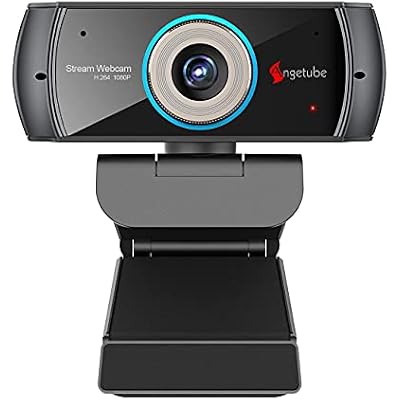
Angetube PC 1080P Webcam with Mic. USB Camera for Video Calling & Recording Video ConferenceOnline TeachingBusiness Meeting Compatible with Computer
Item #:
6166854
GMD 4252
Price Details
Excluding Shipping & Custom charges ( Shipping and custom charges will be calculated on checkout )
*All items will import from US
0 ratings
Write a review
In stock
 Imported from USA store
QTY:
Order now and get it around Friday, June 26
Secured transaction
Ubuy works hard to protect your security and privacy. Our advanced payment security system ensures confidentiality by encrypting your information during transmission using AES (Advanced Encryption Standards) and SSL (Secure Socket Layer) protocols. Your payment details are 100% secure as we do not share your payment details with third party sellers.
Our Top Logistics Partners


PC 1080P Webcam with Mic is the perfect choice for those looking for exceptional image quality during video calling, recording, and streaming.

Fast
Shipping

Free
Return*

Secure Packaging

100% Original Products

PCI DSS Compliance

ISO 27001 Certified


Note: Step Down Voltage Transformer required for using electronics products of US store (110-120). Recommended power converters Buy Now.


What Stands Out
High-Definition Video
Experience crystal-clear 1080P video quality that enhances your video calls and recordings, ensuring you present yourself at your best during conferences and online teaching.
Versatile Compatibility
Easily connect with a variety of devices including desktops, laptops, and MacBooks across multiple operating systems like Windows, iOS, and Linux, making it suitable for any user's setup.
Built-in Microphone
Enjoy clear audio transmission with the integrated microphone, designed to capture clear voice during meetings and classes, eliminating the need for an external microphone.
Product Details
| Item Weight | 0.9 lbs (410 grams) |
Who Should Buy?

-
Online Teachers
Ideal for educators conducting virtual classes, offering clear video and audio quality for effective teaching.
-
Remote Workers
Great for professionals attending remote meetings and video calls, ensuring good communication and engagement.
-
Content Creators
Perfect for livestreaming or creating video content, providing high-definition resolution and built-in microphone.

-
High-End Gamers
May not meet the advanced needs of gamers needing specialized cameras for streaming or high frame rates.
-
Mobile Users
Less suitable for users needing a portable solution, as it is designed primarily for desktops and laptops.
-
Low-Budget Seekers
Might be pricier compared to basic models; not optimal for those looking for the cheapest webcam option.
Product Description
Angetube PC 1080P Webcam with Mic. USB Camera for Video Calling & Recording Video ConferenceOnline TeachingBusiness Meeting Compatible with Computer Desktop Laptop MacBook for Windows iOS Linux
Have any Query? Chat with us
Customer Questions & Answers
-
Question:
What are the key features of the Angetube PC 1080P Webcam?
Answer: The Angetube PC 1080P Webcam offers high-definition video quality at 1080p resolution, making it perfect for video calls and online streaming. Its built-in microphone captures clear audio, enhancing the overall experience during meetings or online classes. The webcam is USB compatible, ensuring easy connectivity to your laptop or desktop without the need for additional drivers. Its versatile design makes it suitable for various applications like video conferencing, online teaching, and business meetings. -
Question:
Is the Angetube Webcam compatible with all operating systems?
Answer: Yes, the Angetube PC 1080P Webcam is compatible with major operating systems including Windows, macOS, and Linux. This cross-platform functionality allows users to utilize the webcam across different devices, making it an ideal choice for diverse environments such as home offices, classrooms, and corporate settings. Whether you're using Zoom, Skype, or other video conferencing software, you can easily integrate the Angetube Webcam into your setup. -
Question:
How does the built-in microphone perform?
Answer: The built-in microphone of the Angetube PC 1080P Webcam is designed to capture clear audio, reducing background noise and ensuring your voice is heard clearly during calls. This feature is particularly useful in video conferences or online teaching scenarios where clear communication is crucial. Users often report minimal echo or feedback, making it suitable for both professional and personal use. -
Question:
What is the field of view of the Angetube Webcam?
Answer: The Angetube PC 1080P Webcam features a wide field of view, typically around 90 degrees, allowing it to capture more of the surroundings. This is particularly advantageous for group video calls where multiple people are present, or for presentations that require sharing visuals. The expansive angle helps ensure that everyone involved is framed well without needing to reposition the camera frequently. -
Question:
Can the Angetube Webcam be used for live streaming?
Answer: Absolutely! The Angetube PC 1080P Webcam is excellent for live streaming on platforms such as Twitch, YouTube, and Facebook Live. Its high-definition video quality and reliable audio performance provide a professional look to your streams, making it a great choice for content creators wanting to engage with their audience effectively. Set it up easily, connect through USB, and start streaming smoothly. -
Question:
Do I need additional software to use the Angetube Webcam?
Answer: No, you do not need additional software to use the Angetube PC 1080P Webcam. It’s designed for plug-and-play functionality, allowing you to connect it directly to your computer via USB and start using it immediately with popular video apps like Zoom, Skype, or Google Meet. This user-friendly feature makes it ideal for those who may not be tech-savvy or those looking for a quick and easy setup. -
Question:
What is the mounting style of the Angetube Webcam?
Answer: The Angetube PC 1080P Webcam features a flexible clip design that allows you to mount it securely on laptops, monitors, or any flat surface. This mounting style provides stability and enables adjustable angles for optimal positioning. It’s perfect for users who may want to switch between different viewing setups, adding to its versatility for various environments like home offices or classrooms. -
Question:
Is the Angetube PC 1080P Webcam good for online teaching?
Answer: Yes, the Angetube PC 1080P Webcam is highly suitable for online teaching. Its 1080p video resolution ensures that your students can see you clearly, while the integrated microphone provides crisp audio, making communication effective. Many educators use this webcam for virtual classrooms to engage students, share screen presentations, and create an interactive learning environment that mirrors in-person teaching. -
Question:
Can I adjust the camera settings on the Angetube Webcam?
Answer: While the Angetube PC 1080P Webcam does not come with dedicated software for adjusting camera settings, it utilizes built-in drivers that allow you to modify basic video settings through your video conferencing software. This flexibility enables users to adjust brightness, contrast, and color balance as needed, ensuring optimal image quality for your specific environment and lighting conditions. -
Question:
Where can I buy the Angetube PC 1080P Webcam?
Answer: You can buy the Angetube PC 1080P Webcam with Mic on Ubuy in The Gambia. Ubuy offers a seamless online shopping experience, with easy navigation and secure payment options, ensuring you can purchase this webcam effortlessly. With fast shipping and reliable customer service, Ubuy is a great destination to secure your new webcam for video calling and recording.
Angetube Webcams Editorial Review
The PC 1080P Webcam with Mic is a good value for the price, offering great video and sound quality, with the option to turn off sound via the software. Although it has manual focus and no zoom control, it is versatile and allows adjustments to the electronic zoom, pic size, and other software settings to adjust the screen size. However, it has also been reported to turn off and on again, and could have some cable issues.
Customer Reviews & Ratings
1 customers ratings
-
5 Star
100%
-
4 Star
0%
-
3 Star
0%
-
2 Star
0%
-
1 Star
0%
Review this product
Share your thoughts with other customers
Pros
- Good value for the price
- Great video and sound quality
- Adjustable electronic zoom and pic size
- Versatile and compatible with android tv OS
Cons
- Manual focus and no zoom control
Product Price History
Important information
- Limitations : For products shipped internationally, please note that any manufacturer warranty may not be valid; manufacturer service options may not be available; product manuals, instructions, and safety warnings may not be in destination country languages; the products (and accompanying materials) may not be designed in accordance with destination country standards, specifications, and labeling requirements; and the products may not conform to destination country voltage and other electrical standards (requiring use of an adapter or converter if appropriate). The recipient is responsible for assuring that the product can be lawfully imported to the destination country. When ordering from Ubuy or its affiliates, the recipient is the importer of record and must comply with all laws and regulations of the destination country.
- Not all the products listed on Ubuy are for sale, as Ubuy is a global search engine. Products are subject to export/trade regulations.
GMD 4252
Order now and get it around Friday, June 26
This item is not restrict in my country.(Please click on above link if this item is not restrict in your country, So our team will review and allow.)
QTY:
Secured transaction
Ubuy works hard to protect your security and privacy. Our advanced payment security system ensures confidentiality by encrypting your information during transmission using AES (Advanced Encryption Standards) and SSL (Secure Socket Layer) protocols. Your payment details are 100% secure as we do not share your payment details with third party sellers.
Our Top Logistics Partners
Fastest cross-border delivery
Features & Benefits
- High-quality image with 7-element glass Lens
- Stereo sound and crystal clear audio with Dual digital noise Cancellation microphones
- Automatic low light correction
- Wide angle view of 100 degrees lens
- Compatible with various video conference apps
- Can be fixed on a tripod