0 ratings


Item #:
24333918
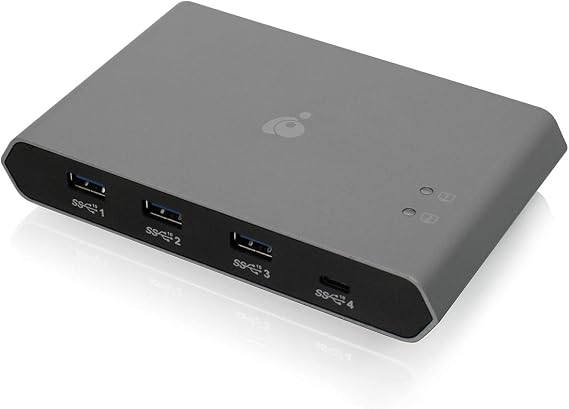
IOGEAR USB-C 2 Port Switch - Transfer Files Between PC & Mac OS X - 3 USB-A - 1 USB-C - Switch Method Remote - Mouse or Hotkey - LED Indicator -
Item #:
24333918
GMD 7592
Price Details
Excluding Shipping & Custom charges ( Shipping and custom charges will be calculated on checkout )
*All items will import from US
0 ratings
Write a review
In stock
 Imported from USA store
Order now and get it around Saturday, August 15
Secured transaction
Ubuy works hard to protect your security and privacy. Our advanced payment security system ensures confidentiality by encrypting your information during transmission using AES (Advanced Encryption Standards) and SSL (Secure Socket Layer) protocols. Your payment details are 100% secure as we do not share your payment details with third party sellers.
Our Top Logistics Partners


Enables two computers to share up to 4 USB peripheral devices, more devices can be supported by adding USB hubs

Fast
Shipping

Free
Return*

Secure Packaging

100% Original Products

PCI DSS Compliance

ISO 27001 Certified


Note: Step Down Voltage Transformer required for using electronics products of US store (110-120). Recommended power converters Buy Now.


What Stands Out
Dual Computer Support
Seamlessly share 4 USB devices between 2 PCs, enhancing productivity without the need to unplug and replug peripherals.
High-Speed Transfer
Achieve data transfer rates up to 480Mbps, ensuring quick and efficient file exchanges for demanding tasks and applications.
Mobile Charging Capability
Charge your mobile devices while using them, offering convenience and staying powered up during critical work and leisure moments.
Product Details
| Compatible Devices | Laptop |
| Connector Type | USB Type C, USB Type A |
| Number of Ports | 2 |
| Brand | IOGEAR |
| Model Number | GUS4C2 |
| UPC | 881317518989 |
| Global Trade Identification Number | 00881317518989 |
| Manufacturer | IOGEAR |
| Mfr Part Number | GUS4C2 |
| Built-In Media | Item |
| Item Dimensions | 5.6 x 3.54 x 0.9 inches (14.2 x 9 x 2.3 cm) |
| Item Weight | 0.65 Pounds (290 grams) |
| Package Quantity | 1 |
| Unit Count | 1.0 Count |
| Number of Items | 1 |
| Color | Black |
| Item dimensions L x W x H | 5.6 x 3.54 x 0.9 inches (14.2 x 9 x 2.3 cm) |
Who Should Buy?

-
Office Professionals
Ideal for users switching between PC and Mac to transfer files efficiently without using multiple peripherals.
-
Tech Enthusiasts
Great for those who frequently work with different operating systems and need versatile connectivity options.
-
Remote Workers
Perfect for remote employees requiring quick access to files across devices while maintaining productivity.

-
Casual Users
Not ideal for users who don't frequently switch between devices or require basic file transfers.
Product Description
IOGEAR USB-C 2 Port Switch - Transfer Files Between PC & Mac OS X - 3 USB-A - 1 USB-C - Switch Method Remote - Mouse or Hotkey - LED Indicator - USB-C 85W Pass Through - GUS4C2
Have any Query? Chat with us
Customer Questions & Answers
-
Question:
What is the IOGEAR 4x2 USB 3.0 Peripheral Sharing Switch used for?
Answer: The IOGEAR 4x2 USB 3.0 Peripheral Sharing Switch is designed to allow users to easily share four USB devices between two computers. This device is particularly useful in environments where multiple computers need access to the same peripherals, such as printers, scanners, or external storage. By connecting the peripherals to the switch, you can control which computer accesses them via a single press of a button, enhancing efficiency and convenience in both home and office settings. -
Question:
How do I connect my devices to the IOGEAR Peripheral Sharing Switch?
Answer: To connect your devices, simply plug your USB peripherals into the corresponding ports on the IOGEAR switch and use the included cables to connect the switch to each of the two computers. Ensure that the switch is powered appropriately. This setup allows seamless communication between the connected devices and computers, enabling you to switch control effortlessly via the remote or button on the switch itself. -
Question:
Is the IOGEAR Peripheral Sharing Switch compatible with both PC and Mac?
Answer: Yes, the IOGEAR 4x2 USB 3.0 Peripheral Sharing Switch is compatible with both PC and Mac systems. This versatility makes it an ideal choice for mixed-environment offices or homes where different types of computers are used. Whether you're a Mac user needing to print from Windows or vice versa, this device ensures smooth functionality across platforms without the need for additional drivers. -
Question:
What types of USB devices can I connect to the IOGEAR switch?
Answer: You can connect a variety of USB devices to the IOGEAR switch, including printers, scanners, external hard drives, and USB hubs. The switch is designed to support USB 3.0, which offers faster data transfer rates compared to its predecessors, making it suitable for high-demand devices. This flexibility allows users to configure their workstation according to specific needs, whether for productivity or entertainment. -
Question:
Does the IOGEAR Peripheral Sharing Switch come with cables and a remote?
Answer: Yes, the IOGEAR Peripheral Sharing Switch includes the necessary cables for connecting to your computers, as well as a remote control for switching between computers. The inclusion of cables means you can set up your device right out of the box without needing to purchase additional accessories. The remote adds convenience, allowing you to switch devices from a distance, perfect for setups where the computers and peripherals are not physically close. -
Question:
Can I use the IOGEAR switch with USB hubs?
Answer: Yes, the IOGEAR 4x2 USB 3.0 Peripheral Sharing Switch can be used with USB hubs. This allows users to expand the number of devices that can be shared across the two computers. When using a USB hub with the switch, ensure that the hub supports USB 3.0 to maintain optimal performance. This configuration is ideal for users who have multiple devices that need to be accessed simultaneously without the hassle of disconnecting and reconnecting. -
Question:
What are the LED indicators used for on the IOGEAR switch?
Answer: The IOGEAR switch is equipped with LED indicators that provide visual feedback on which computer is currently active and which peripherals are being used. This feature allows users to quickly identify the operational status of their devices without needing to check the computers directly. It enhances the user experience by ensuring clarity, especially in fast-paced environments where multiple devices may be in use. -
Question:
What is the maximum data transfer speed supported by the IOGEAR Peripheral Sharing Switch?
Answer: The IOGEAR 4x2 USB 3.0 Peripheral Sharing Switch supports ultra-fast data transfer speeds of up to 5 Gbps. This high-speed capability ensures that data-heavy tasks, such as transferring large files or high-resolution images, are completed efficiently. Whether you're working in a graphics-intensive field or simply require speedy access to your files, this switch is optimized to meet those needs. -
Question:
Where can I buy the IOGEAR 4x2 USB 3.0 Peripheral Sharing Switch in The Gambia?
Answer: You can purchase the IOGEAR 4x2 USB 3.0 Peripheral Sharing Switch from Ubuy in The Gambia. Ubuy offers a convenient platform to browse, compare, and shop for a variety of tech products, including the IOGEAR switch, ensuring that you can find the device you need for your USB sharing needs. -
Question:
Can I manually switch between computers on the IOGEAR Peripheral Sharing Switch?
Answer: Yes, you can manually switch between computers using the switch's remote control or the button located on the device itself. This feature allows for quick and effortless switching, making it easy to alternate between computers without unplugging peripherals. This is particularly beneficial in collaborative environments where multiple users may need to access shared devices quickly.
IOGEAR KVM Switches GUS4C2 Editorial Review
The IOGEAR USB-C 2-Port Keyboard Mouse and Peripheral Switch with Power Delivery (GUS4C2) has a removable remote switch with a cable just over 5 feet long. The included micro USB input port powers the device, effectively turning it into a USB hub when plugged in. When switching between computers, the connected OS recognizes the keyboard and mouse as unplugged but there is zero input lag during gameplay. The switch can be used to connect a printer to two PCs, but only one can be used at a time. Criticisms were found in the occasional LED lighting that was Considered too bright and obnoxious. Multiple users also reported a lack of durability with the device failing after around a year's worth of use. Some users felt that the device should have been designed to include a power connection rather than powering it with a separate micro-USB cable. Some users experienced delays when switching between computers. Overall, many users found the IOGEAR switch to be a solid and beneficial purchase.
Customer Reviews & Ratings
1 customers ratings
-
5 Star
0%
-
4 Star
100%
-
3 Star
0%
-
2 Star
0%
-
1 Star
0%
Review this product
Share your thoughts with other customers
Pros
- Zero input lag during gameplay
- Can be used for keyboard/mouse sharing between desktop PCs
- Easy to switch between connected computers
Cons
- Bright and obnoxious LED lighting
Platform Trust & Buyer Confidence

MA
Mohammad
Verified buyer
“Excellent quality and original too,when ubuy send original things I will appreciate that ,I very satisfied thank you”
23 July 2026 · via Trustpilot
CK
Chitra
Verified buyer
“The order and delivery progress was communicated very well. Package arrived within the estimated time. Products arrived as expected in good condition.”
22-Jul-26 · via Trustpilot
K
kund
Verified buyer
“Good supply of products. Safe payment methods, and shipment worldwide! Genuine products.”
23-Jul-26 · via Trustpilot
OO
Onesi
Verified buyer
“Was my first time buying a product from Ubuy, but I found it so helpful. This is reliable. Gonna place a new order!”
22 July 2026 · via Trustpilot
SJ
SAO JOHN
Verified buyer
“Ubuy is a great online platform to buy stuff. Reliable, fast delivery time and great value for money. I've been using Ubuy online shopping platform for three years now and will continue to do so.”
23 July 2026 · via Trustpilot
Secure Checkout
Global Delivery
Easy Returns
Genuine Products
Product Price History
Important information
- Limitations : For products shipped internationally, please note that any manufacturer warranty may not be valid; manufacturer service options may not be available; product manuals, instructions, and safety warnings may not be in destination country languages; the products (and accompanying materials) may not be designed in accordance with destination country standards, specifications, and labeling requirements; and the products may not conform to destination country voltage and other electrical standards (requiring use of an adapter or converter if appropriate). The recipient is responsible for assuring that the product can be lawfully imported to the destination country. When ordering from Ubuy or its affiliates, the recipient is the importer of record and must comply with all laws and regulations of the destination country.
- Not all the products listed on Ubuy are for sale, as Ubuy is a global search engine. Products are subject to export/trade regulations.
GMD 7592
Order now and get it around Saturday, August 15
This item is not restrict in my country.(Please click on above link if this item is not restrict in your country, So our team will review and allow.)
QTY:
Secured transaction
PCI DSS compliant and ISO 27001:2022 certified, with encrypted payments and full buyer protection on every order.
Our Top Logistics Partners
Fastest cross-border delivery
Features & Benefits
- Easily switch between two computers with the press of a button
- USB 2.0 compliant with data transfer rate of up to 480 Mbps
- Over current protection to prevent damage to devices
- Molded cable design for easier installation and reduced clutter
- Allows charging and syncing of mobile devices through the switch
- Eliminates the cost and clutter of multiple sets of USB devices
Ubuy Assurance
Experience worry-free shopping with 100% original products, PCI DSS-compliant payment security, ISO 27001-certified data protection, the fastest cross-border delivery, free returns *, and secure packaging on every order.