- Home Page /
- Electronics /
- Computer Accessories /
- Tablet Replacement Parts /
- Screens /
- for iPad Air 4 4th Gen Screen Replacement A23...
0 ratings

Item #:
37311176
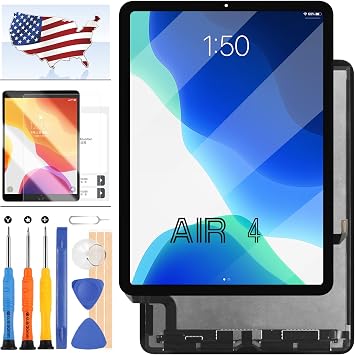
for iPad Air 4 4th Gen Screen Replacement A2324 A2072 A2325 A2316 for iPad Air 4 (2020) 10.9 LCD Display Touch Digitizer Assembly Sensor Glass Panel
Item #:
37311176
GMD 13691
Price Details
Excluding Shipping & Custom charges ( Shipping and custom charges will be calculated on checkout )
*All items will import from US
0 ratings
Write a review
In stock
 Imported from USA store
QTY:
Order now and get it around Saturday, June 27
Secured transaction
Ubuy works hard to protect your security and privacy. Our advanced payment security system ensures confidentiality by encrypting your information during transmission using AES (Advanced Encryption Standards) and SSL (Secure Socket Layer) protocols. Your payment details are 100% secure as we do not share your payment details with third party sellers.
Our Top Logistics Partners


A+ Quality LCD Display Touch Screen Digitizer Glass Assembly Replacement kit For iPad AIR 4 4TH Gen

Fast
Shipping

Free
Return*

Secure Packaging

100% Original Products

PCI DSS Compliance

ISO 27001 Certified


Note: Step Down Voltage Transformer required for using electronics products of US store (110-120). Recommended power converters Buy Now.


What Stands Out
Complete Assembly
This kit includes a full LCD display, touch digitizer, and sensor glass panel, providing everything needed for a seamless screen replacement experience.
User-Friendly Tools
Comes with essential tools for installation, ensuring a hassle-free setup process for both DIY enthusiasts and novice users alike.
Included Screen Protector
A high-quality screen protector is included, offering added protection against scratches and damage, enhancing the longevity of your iPad Air 4 screen.
Product Details
- Compatible with iPad Air 4 4th Gen 2020 A2324 A2072 A2325 A2316
- Used for screen replacement to fix faulty, cracked, or non-functioning screens
- Includes LCD Display Touch Screen, Tempered Glass, Suction Cup, Opening Tools, Card Pin, Spudger, and Adhesive Tape
- Strictly QC tested for quality, with high color saturation, resolution, and smooth touch
- A+ Quality LCD Display Touch Screen Digitizer Glass Assembly Replacement kit
- 3 months warranty with customer service support available 24 hours for any issues
| Item Weight | 1.2 lbs (540 grams) |
Who Should Buy?

-
DIY Repair Enthusiasts
Ideal for users comfortable with technology who prefer fixing devices themselves rather than relying on professional services.
-
Budget-Conscious Users
A suitable choice for those looking to save money by replacing their iPad Air screen instead of buying a new device.
-
Tech Savvy Students
Perfect for students who often use their iPads for classes and need a reliable replacement for a damaged screen.

-
Non-Technical Users
Not suitable for individuals lacking technical skills or confidence in performing the screen replacement themselves.
-
Time Constraints
Not ideal for users who need a quick solution, as DIY repairs can be time-consuming and may require troubleshooting.
-
Warranty Concerns
Users whose devices are still under warranty may void it by replacing the screen themselves, making this product unsuitable.
Product Description
for iPad Air 4 4th Gen Screen Replacement A2324 A2072 A2325 A2316 for iPad Air 4 (2020) 10.9 LCD Display Touch Digitizer Assembly Sensor Glass Panel Parts Kits,with Tools +Screen Protector
About This Item
Introducing the iPad Air 4 4th Gen Screen Replacement Kit, specially designed for your iPad Air 4 2020 10.9. This comprehensive kit includes all the necessary parts and tools to easily replace your damaged or broken screen, allowing you to enjoy a crystal-clear display once again. Crafted with precision, this screen replacement is compatible with iPad Air 4 models A2324, A2072, A2325, and A2316, ensuring a seamless fit and optimal performance.
The LCD display and touch digitizer assembly guarantee vibrant colors, sharp details, and smooth touch response, just like the original. With the included free tools and step-by-step instructions, you can effortlessly replace your screen without any professional assistance. The kit also comes with a screen protector to keep your device safe from scratches and smudges, ensuring long-lasting clarity. Don't let a cracked or malfunctioning screen hold you back from fully enjoying your iPad Air 4. Upgrade to this premium screen replacement kit and experience the brilliance of a brand-new display.
Enhance your entertainment, productivity, and overall user experience with this top-quality replacement. Invest in the best for your iPad Air 4. Purchase the iPad Air 4 4th Gen Screen Replacement Kit now and bring your device back to life with stunning visuals and responsive touch functionality.
Have any Query? Chat with us
Customer Questions & Answers
-
Question:
What is included in the iPad Air 4 4th Gen Screen Replacement kit?
Answer: The iPad Air 4 4th Gen Screen Replacement kit includes the complete LCD display assembly, which features a touch digitizer, sensor glass panel, and all necessary components for a seamless installation. This comprehensive set ensures you have everything you need to replace your damaged screen without needing to purchase additional tools or parts. Designed specifically for the iPad Air 4 from 2020, this kit guarantees compatibility, making it suitable for home repairs or professional servicing. -
Question:
How do I know if my iPad Air 4 screen needs replacement?
Answer: Signs that your iPad Air 4 screen may need replacement include visible cracks, unresponsive touch areas, or discoloration and dead pixels on the display. If these issues impair your usage or make the screen uncomfortable to view, it’s advisable to consider a replacement. Observing these symptoms early can protect the internal components and improve overall functionality, enhancing your user experience on the device. -
Question:
Is it difficult to replace the iPad Air 4 screen myself?
Answer: Replacing the iPad Air 4 screen can be moderately challenging, depending on your experience with electronic repairs. It involves carefully opening the device, disconnecting components, and accurately installing the new screen. For those comfortable with DIY repairs, online tutorials provide step-by-step guidance, making the process manageable. However, if you're unsure or inexperienced, seeking professional help can ensure your device is properly serviced without risk of further damage. -
Question:
What tools are recommended for replacing the iPad Air 4 screen?
Answer: To successfully replace the iPad Air 4 screen, essential tools include a heat gun or hairdryer for loosening adhesive, a suction cup for lifting the screen, plastic spudgers for prying open the device, and a set of precision screwdrivers for removing screws. Using the right tools minimizes the risk of damaging components during the repair process, ensuring your replacement is done with accuracy and care. -
Question:
Can I use a third-party screen replacement for my iPad Air 4?
Answer: Yes, third-party screen replacements can be used for the iPad Air 4, provided they are compatible with the model A2324, A2072, A2325, or A2316. However, it's crucial to select high-quality parts from reputable sources to maintain the display's performance and ensure durability. High-quality replacements can restore functionality, but using low-quality products may lead to poor resolution or unresponsive touch features, undermining your device's performance. -
Question:
Will replacing the screen affect my device’s touch sensitivity?
Answer: A properly installed screen replacement should not affect your device’s touch sensitivity. The touch digitizer is designed to maintain the responsiveness and accuracy of your device. Ensuring that all components are securely connected and calibrated during installation can help retain the original functionality of the touchscreen. Positive user feedback often reflects high satisfaction regarding touch performance after a successful install. -
Question:
Are there any safety precautions I should take when replacing my screen?
Answer: Absolutely, taking safety precautions when replacing your iPad Air 4 screen is essential. Work in a clean, static-free environment to avoid damaging sensitive components. Wear safety glasses to protect your eyes from glass shards, and ensure your device is powered off before beginning the repair. Handling tools with care and following all instructions diligently can minimize risks and help ensure a successful repair experience. -
Question:
How can I ensure I am purchasing a compatible screen?
Answer: To ensure you are purchasing a compatible screen for your iPad Air 4, check for the specific model numbers: A2324, A2072, A2325, or A2316. Additionally, purchase from trusted retailers that specialize in tablet parts, as they usually provide detailed specifications and compatibility information. Reading customer reviews can also help you gauge the quality and reliability of the screen replacement you are considering. -
Question:
Where can I buy iPad Air 4 4th Gen Screen Replacement in The Gambia?
Answer: You can conveniently purchase the iPad Air 4 4th Gen Screen Replacement at Ubuy in The Gambia. Ubuy offers a wide selection of replacement parts, including the LCD display touch digitizer assembly specifically designed for the iPad Air 4 2020 model. Their platform ensures a straightforward shopping experience, along with reliable options to find the latest parts for your device. -
Question:
What are some common causes of iPad Air 4 screen damage?
Answer: Common causes of screen damage on the iPad Air 4 include accidental drops, heavy impacts, and exposure to extreme temperatures. Additionally, using the device without adequate protection, such as a case or screen protector, increases the risk of damage. Proper handling and investing in protective accessories can help safeguard your device and extend its lifespan, minimizing the chances of needing a screen replacement.
A-MIND Screens Editorial Review
In reviewing the customer experiences related to this screen replacement product, it becomes clear that while the end result is often satisfactory, the journey to that point is not without its challenges. Customers generally praise the overall quality and responsiveness of the screen once installed, indicating it performs well post-installation. Many reviewers noted that the installation process was straightforward, making it accessible even for those who might be new to such tasks. However, issues with the initial product received were common, with complaints about damaged screens upon arrival. Users reported concerns that some of these damages likely occurred before the product was even packed for shipment. Additionally, while many were able to successfully manage their installations, there were instances of screens functioning with backlighting but lacking any display at all. Another noteworthy point raised was the absence of a screen adhesive in the package, which left some customers scrambling to find alternatives. Those who were well-prepared with their own adhesives were able to circumvent this issue, but novices may find this lack of provided components frustrating. In summary, the screen replacement product eventually meets customer expectations in functionality and ease of installation, but suffers from quality control issues and missing items that could hinder the experience for some buyers. **
Customer Reviews & Ratings
1 customers ratings
-
5 Star
100%
-
4 Star
0%
-
3 Star
0%
-
2 Star
0%
-
1 Star
0%
Review this product
Share your thoughts with other customers
Pros
- Good quality screen that responds well post-installation.
- Generally easy installation process, even for novices.
Cons
- Frequent reports of damaged screens upon arrival.
Product Price History
Important information
- Limitations : For products shipped internationally, please note that any manufacturer warranty may not be valid; manufacturer service options may not be available; product manuals, instructions, and safety warnings may not be in destination country languages; the products (and accompanying materials) may not be designed in accordance with destination country standards, specifications, and labeling requirements; and the products may not conform to destination country voltage and other electrical standards (requiring use of an adapter or converter if appropriate). The recipient is responsible for assuring that the product can be lawfully imported to the destination country. When ordering from Ubuy or its affiliates, the recipient is the importer of record and must comply with all laws and regulations of the destination country.
- Not all the products listed on Ubuy are for sale, as Ubuy is a global search engine. Products are subject to export/trade regulations.
GMD 13691
Order now and get it around Saturday, June 27
This item is not restrict in my country.(Please click on above link if this item is not restrict in your country, So our team will review and allow.)
QTY:
Secured transaction
Ubuy works hard to protect your security and privacy. Our advanced payment security system ensures confidentiality by encrypting your information during transmission using AES (Advanced Encryption Standards) and SSL (Secure Socket Layer) protocols. Your payment details are 100% secure as we do not share your payment details with third party sellers.
Our Top Logistics Partners
Fastest cross-border delivery
Features & Benefits
- Compatible with multiple iPad AIR 4 models
- Includes all necessary tools for installation
- Screens are tested for perfect functionality
- 3 months warranty provided for exchange of faulty screens
- Responsive customer service team available for assistance