- Home Page /
- Mobile Phone Accessories /
- Accessories /
- Maintenance, Upkeep & Repairs /
- Replacement Parts /
- Screens /
- Screen Replacement for Samsung Galaxy A71 A71...
0 ratings




Item #:
44449340
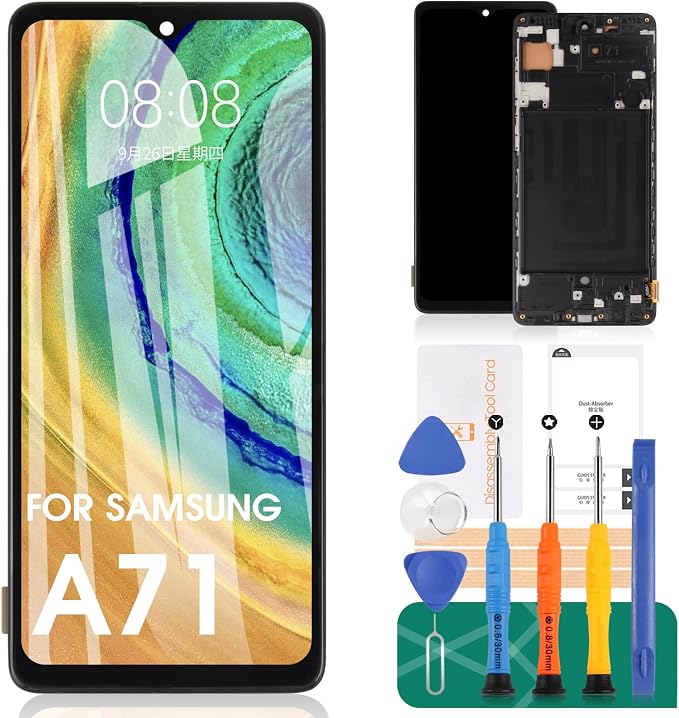
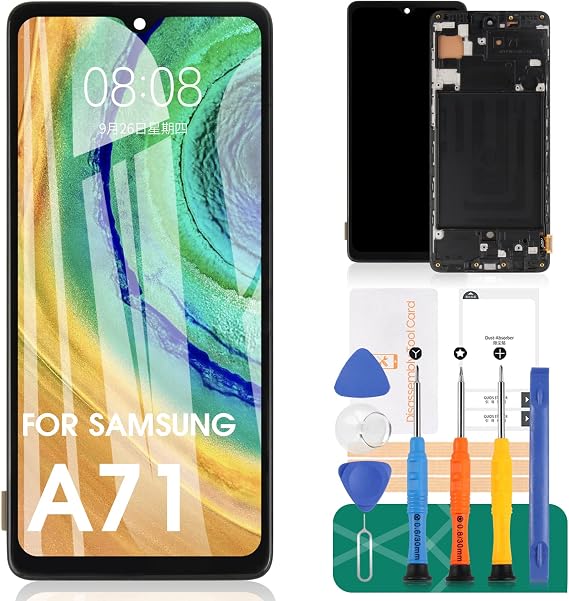
Screen Replacement for Samsung Galaxy A71 A715 A715F A715FD 6.7" LCD Display Touch Digitizer Glass Assembly with Frame (Not for A71 5G/A716)
76% of respondents would recommend this to a friend
Item #:
44449340
GMD 2033
Price Details
Excluding Shipping & Custom charges ( Shipping and custom charges will be calculated on checkout )
*All items will import from US
0 ratings
Write a review
In stock
 Imported from USA store
QTY:
Only 2 items left in stock.
Order now and get it around Wednesday, July 08
Secured transaction
Ubuy works hard to protect your security and privacy. Our advanced payment security system ensures confidentiality by encrypting your information during transmission using AES (Advanced Encryption Standards) and SSL (Secure Socket Layer) protocols. Your payment details are 100% secure as we do not share your payment details with third party sellers.
Our Top Logistics Partners


LCD Replacement Screen for Samsung Galaxy A71 6.7inch with Frame - Fix your phone screen like new again!

Fast
Shipping

Free
Return*

Secure Packaging

100% Original Products

PCI DSS Compliance

ISO 27001 Certified


Note: Step Down Voltage Transformer required for using electronics products of US store (110-120). Recommended power converters Buy Now.


What Stands Out
High Compatibility
Designed specifically for Samsung Galaxy A71 models, ensuring perfect fit and function. Avoids issues with incompatible versions, such as the A71 5G.
Complete Assembly
Includes LCD display, touch digitizer, and glass assembly with frame, providing everything needed for a hassle-free replacement experience.
Quality Assurance
Manufactured with high-quality materials for durability and responsive touch, ensuring a reliable and enhanced user experience once installed.
Product Details
- Compatibility ----- For Samsung Galaxy A71 6.7inch LCD Display (Not Fit For A71 5G).Please make sure your device model before purchase.
- Scope of Application ----- Use for fix a faulty screen,and cure-replace cracked, broken, dead pixels, touch is not working, touch response issues, display problems,wrong color issues ,non-functioned screen.etc.
- Quality Assurance ----- All products have passed strictly QC double tested and 100% in good condition before shipment.Make sure no scratch/no dead area/ no dot pixel or line in the screen.
- INCELL screen-----The INCELL screen size is smaller than the original one and the screen does not have a fingerprint sensor. The original screen has a fingerprint sensor, but the INCELL screen is also a high-quality screen, and we will test it before shipping.
| Package Dimensions | 7.44 x 4.06 x 1.18 inches (18.9 x 10.3 x 3 cm) |
| Item Weight | 6 ounces (170.1 grams) |
| Other display features | Wireless |
| Color | Dark |
| Manufacturer | SRJTEK |
| Date First Available | March 31, 2021 |
Who Should Buy?

-
DIY Repair Enthusiasts
Ideal for users who enjoy fixing devices and want to save money by replacing their own screen.
-
Budget-Conscious Users
Perfect for users looking for an affordable replacement option to extend the life of the Galaxy A71.
-
Users with Minor Damage
Recommended for individuals whose screens are cracked or malfunctioning but still function adequately otherwise.

-
Professionals Seeking Quality
Not suitable for technicians who prefer using OEM parts for guaranteed quality and warranty support.
-
Inexperienced Users
Not ideal for individuals lacking the skills or tools for successful screen replacement without damaging the device.
-
5G Model Owners
Not compatible with Samsung Galaxy A71 5G models; users should avoid purchasing if they own this version.
Product Description
Have any Query? Chat with us
Customer Questions & Answers
-
Question:
What is included in the Screen Replacement for Samsung Galaxy A71?
Answer: The Screen Replacement for Samsung Galaxy A71 includes a high-quality LCD display, touch digitizer, glass assembly, and the frame necessary for installation. The combination ensures that your screen functions like new, providing vibrant visuals and responsive touch. It's crucial to ensure you have all these components for a hassle-free replacement and optimal display performance, especially if you're repairing a cracked or unresponsive screen. -
Question:
Is this screen replacement compatible with all versions of the Samsung Galaxy A71?
Answer: No, this screen replacement is specifically designed for Samsung Galaxy A71 models A715, A715F, and A715FD, and is not compatible with the A71 5G (A716). Therefore, it’s essential to verify your phone model before purchasing to ensure that you receive a compatible product. Using an incorrect screen may result in improper fit or functionality. -
Question:
How do I install the Screen Replacement for Samsung Galaxy A71?
Answer: Installing the Screen Replacement involves careful disassembly of your A71. Begin by powering off the device, then use a heat gun or hairdryer to soften the adhesive. Carefully remove the old screen with appropriate tools, clean the area, and then place the new display into position, reattaching any cables. Following detailed online tutorials can also enhance your installation process, providing step-by-step guidance. -
Question:
What tools do I need to replace the screen on the Samsung Galaxy A71?
Answer: To replace the screen on the Samsung Galaxy A71, you typically need a set of precision screwdrivers, a plastic prying tool, tweezers, and a heat source (like a hairdryer) to loosen adhesive. These tools facilitate a smooth process, allowing you to carefully open the device without causing damage to internal components, ensuring a successful replacement. -
Question:
How can I test if the new screen is functioning properly before final installation?
Answer: Before finalizing the installation of your new screen, connect it cautiously to the motherboard while leaving it loose. Power on your device to check for any display issues, touch responsiveness, or color irregularities. This step allows you to confirm that the replacement screen works perfectly before committing to a full installation, saving you time and effort. -
Question:
What should I do if the touch functionality is not working after installation?
Answer: If the touch functionality is not working after installation, first ensure that all connections are secure. Check the flex cable and connectors; sometimes they may not be fully seated. If everything appears connected properly but still fails, you might need to redo the installation or consult an expert to avoid further damage. -
Question:
Can I use my phone while the screen is being replaced?
Answer: No, you should turn off your phone and avoid using it during the screen replacement process. Attempting to use the device while the screen is being replaced poses risks such as damaging internal components or accidentally experiencing electric shock. Ensuring the device is powered off maximizes safety and helps maintain functionality. -
Question:
What precautions should I take while replacing the screen on my Samsung Galaxy A71?
Answer: While replacing the screen, it’s important to work in a clean, static-free environment. Avoid applying too much heat while loosening adhesive and use tools designed for electronics to minimize the risk of damage. Wear safety glasses to protect your eyes from any glass shards or hazards while working, ensuring a safe repair experience. -
Question:
How does this screen replacement improve my device’s performance?
Answer: Installing a new screen replacement can significantly improve your device's overall performance by restoring clarity, touch sensitivity, and screen responsiveness. A high-quality replacement can also enhance visual experience, allowing you to enjoy media with vibrant colors and better visibility. This is especially important if your original screen shows signs of damage or decay. -
Question:
Where can I buy Screen Replacement for Samsung Galaxy A71?
Answer: You can buy the Screen Replacement for Samsung Galaxy A71 at Ubuy. They offer a wide variety of mobile phone accessories, ensuring that you receive a product that meets your specifications. This online platform provides a user-friendly experience, making it easy to find and order the correct screen assembly for your device.
SRJTEK Screens Editorial Review


No editorial reviews found
Customer Reviews & Ratings
22 customers ratings
-
5 Star
43%
-
4 Star
21%
-
3 Star
0%
-
2 Star
15%
-
1 Star
21%
Review this product
Share your thoughts with other customers
Platform Trust & Buyer Confidence

MT
Mohd
Verified buyer
“The product received very good packaging & safe…Thank You”
16 June 2026 · via Trustpilot
SJ
Shawati
Verified buyer
“Accurate delivery timing given”
16 June 2026 · via Trustpilot
YB
Youcef
Verified buyer
“Not madly expensive like I thought, and much quicker than promised.”
15 June 2026 · via Trustpilot
LM
Leila
Verified buyer
“Never dealt with Ubuy before, but everything worked out great. Seamless cross border purchasing and shipping. Thanks!”
6/7/2026 · via Trustpilot
KA
Kwame
Verified buyer
“The process was smooth, with clear communication and timelines. This was my 1st purchase and I am really impressed. I will definitely be coming back.”
12 June 2026 · via Trustpilot
Secure Checkout
Global Delivery
Easy Returns
Genuine Products
People also bought these Items



![Marvel's Iron Fist Season 1 [DVD] [2018]](https://images-cdn.ubuy.co.in/633ff73df622922cd24130bc-marvel-39-s-iron-fist-season-1.jpg)


Product Price History
Important information
- Limitations : For products shipped internationally, please note that any manufacturer warranty may not be valid; manufacturer service options may not be available; product manuals, instructions, and safety warnings may not be in destination country languages; the products (and accompanying materials) may not be designed in accordance with destination country standards, specifications, and labeling requirements; and the products may not conform to destination country voltage and other electrical standards (requiring use of an adapter or converter if appropriate). The recipient is responsible for assuring that the product can be lawfully imported to the destination country. When ordering from Ubuy or its affiliates, the recipient is the importer of record and must comply with all laws and regulations of the destination country.
- Not all the products listed on Ubuy are for sale, as Ubuy is a global search engine. Products are subject to export/trade regulations.
GMD 2033
Order now and get it around Wednesday, July 08
This item is not restrict in my country.(Please click on above link if this item is not restrict in your country, So our team will review and allow.)
QTY:
Only 2 items left in stock.
Secured transaction
Ubuy works hard to protect your security and privacy. Our advanced payment security system ensures confidentiality by encrypting your information during transmission using AES (Advanced Encryption Standards) and SSL (Secure Socket Layer) protocols. Your payment details are 100% secure as we do not share your payment details with third party sellers.
Our Top Logistics Partners
Fastest cross-border delivery
Features & Benefits
- Compatible with Samsung Galaxy A71 6.7inch LCD Display
- Used to fix faulty screens, cracked, broken, dead pixels, touch is not working, touch response issues, display problems,wrong color issues ,non-functioned screen etc.
- Comes with Repair Tool Kits and Screen Protector
- Strictly QC double tested and 100% in good condition before shipment
- No scratch/no dead area/ no dot pixel or line in the screen
- Bring new life to your phone with a LCD Replacement Screen