0 ratings




Item #:
144383554
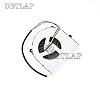
New Fan for Clevo W230SS W230ST W230N W230SD W350ET W350STQ W370S W370ST Laptop CPU Cooling Fan
Item #:
144383554
GMD 2388
Price Details
Excluding Shipping & Custom charges ( Shipping and custom charges will be calculated on checkout )
*All items will import from US
0 ratings
Write a review
In stock
 Imported from USA store
QTY:
Order now and get it around Thursday, July 16
Secured transaction
Ubuy works hard to protect your security and privacy. Our advanced payment security system ensures confidentiality by encrypting your information during transmission using AES (Advanced Encryption Standards) and SSL (Secure Socket Layer) protocols. Your payment details are 100% secure as we do not share your payment details with third party sellers.
Our Top Logistics Partners


Each item will be Tested it one by one before shipping ensure 100% work.

Fast
Shipping

Free
Return*

Secure Packaging

100% Original Products

PCI DSS Compliance

ISO 27001 Certified


Note: Step Down Voltage Transformer required for using electronics products of US store (110-120). Recommended power converters Buy Now.


What Stands Out
Enhanced Cooling Efficiency
This cooling fan offers superior airflow to keep your laptop's CPU at optimal temperatures, preventing overheating and improving overall performance.
Compatibility
Designed specifically for various Clevo models, this fan ensures a perfect fit and reliable operation, eliminating the guesswork when replacing your laptop cooling system.
Silent Operation
Engineered with noise reduction technology, this fan operates quietly, allowing for an uninterrupted work environment while maintaining effective cooling.
Product Details
- DBTLAP Fan Compatible for Clevo W230SS W230ST W230N W230SD W350ET W350STQ W370S W370ST Laptop CPU Cooling Fan
- 【Quality Item】 Each item will be Tested it one by one before shipping ensure 100% work.
- 【Warm Tips】All pictures are taken in kind, please check carefully with your original fan before buying. If you can not sure whether it fit Compatible For your need, please contact with us before buy it to avoid choose wrong.
| Power Connector Type | 3-Pin |
| Voltage | 5 Volts |
| Wattage | 2 watts |
| Compatible Devices | Laptop |
| Brand Name | DBTLAP |
| Manufacturer | DBTLAP |
| Part Number | Clevo W230SS fan |
| Item Weight | 0.02 Kilograms |
| Unit Count | 1 Count |
| Brand | DBTLAP |
Who Should Buy?

-
Gaming Enthusiasts
Ideal for gamers looking to maintain optimal cooling during extended gaming sessions to prevent overheating.
-
Frequent Users
Perfect for users who utilize their laptop daily for work or entertainment, needing reliable cooling performance.
-
Tech Savvy Individuals
Recommended for DIY enthusiasts comfortable replacing laptop parts, ensuring their cooling system is efficient and effective.

-
Casual Users
Less suitable for users who only perform lightweight tasks and don't require high-performance cooling solutions.
-
Budget-Conscious Buyers
Might not be ideal for those prioritizing cost, as performance-focused cooling fans can come at a premium.
-
Non-Clevo Users
Not appropriate for users with other laptop brands, as this fan is specifically designed for Clevo models.
Product Description
Have any Query? Chat with us
Customer Questions & Answers
-
Question:
What devices are compatible with the New Fan for Clevo W230SS W230ST W230N W230SD W350ET W350STQ W370S W370ST?
Answer: The New Fan for Clevo models W230SS, W230ST, W230N, W230SD, W350ET, W350STQ, W370S, and W370ST is designed specifically to fit these Clevo laptops. This cooling fan is crucial for maintaining optimal performance and preventing overheating. If your laptop belongs to any of these models, this fan replacement will ensure your device runs smoothly and efficiently, especially during demanding tasks such as gaming or video editing. -
Question:
How can I determine if I need to replace my laptop's cooling fan?
Answer: Signs that your laptop's cooling fan needs replacement include excessive heat, unusual noises like grinding or rattling, and frequent system overheating. If your laptop shuts down unexpectedly or struggles to perform under load, it's likely that the fan is malfunctioning. Replacing the cooling fan can restore your laptop's stability and performance, making it a valuable upgrade for users engaged in resource-heavy activities. -
Question:
What are the benefits of replacing my laptop's cooling fan?
Answer: Replacing your laptop's cooling fan can significantly enhance its longevity and performance. A new fan improves airflow, which helps to dissipate heat generated from the CPU and GPU. This is especially beneficial when performing intensive tasks like gaming or running high-processing applications, as it prevents thermal throttling, ensuring your laptop maintains optimal speeds and performance levels throughout usage. -
Question:
Is it difficult to install the New Fan for Clevo laptops?
Answer: Installing the New Fan for Clevo laptops can be straightforward, especially if you have basic technical knowledge. It typically involves opening the laptop casing, disconnecting the old fan, and securing the new one in place. However, following a guide or watching tutorial videos can help simplify the process. It's recommended for users who are comfortable with DIY repairs. This installation can restore your laptop to its intended performance levels without professional assistance. -
Question:
Can I clean my existing fan instead of replacing it?
Answer: Yes, cleaning your existing fan can improve performance if it's just clogged with dust and debris. Using compressed air to blow out dirt can restore airflow. However, if the fan is making strange noises or not functioning efficiently, replacement is a better option. Regular maintenance and cleaning can extend the life of your fan but will not resolve mechanical failures. Knowing when to clean versus replace is key to maintaining optimal laptop performance. -
Question:
What tools do I need to replace the cooling fan in my Clevo laptop?
Answer: To replace the cooling fan for your Clevo laptop, you will typically need a Phillips screwdriver, a plastic pry tool, and possibly an anti-static wrist strap to prevent static discharge. Having a clean workspace is essential. With these tools, you can safely access the internals of your laptop, ensuring that the fan replacement process is as smooth as possible. Proper tools ensure that no damage occurs during the installation, ultimately safeguarding your device. -
Question:
What are the signs of a failing laptop fan?
Answer: A failing laptop fan might produce irregular sounds such as whining or grinding, operate intermittently, or fail to start altogether. Performance issues like overheating or system crashes during use are also common signs. Monitoring these symptoms can alert you to potential failures early on, allowing you to take action before it leads to more significant hardware failures. Being proactive in fan maintenance can save on more costly repairs down the line. -
Question:
How can I optimize my laptop's cooling system for better performance?
Answer: To optimize your laptop's cooling system, keep the vents unblocked and ensure there's adequate airflow around it. Regularly clean the internal components, including the fan, to prevent dust buildup. Additionally, consider using a cooling pad during intense tasks. These practices can significantly enhance cooling efficiency and prevent overheating, thus maintaining your laptop’s peak performance even during demanding workloads. -
Question:
What should I look for in a replacement fan for Clevo laptops?
Answer: When choosing a replacement fan for Clevo laptops, look for compatibility with your specific model, durability, and noise levels. Verify the fan's specifications against your current fan to ensure a proper fit. High-quality fans often operate more quietly and efficiently, which can enhance your overall user experience. Selecting the right fan is essential to maintain the longevity of your laptop and ensure optimal cooling during operation. -
Question:
Where can I buy a New Fan for Clevo W230SS W230ST W230N W230SD W350ET W350STQ W370S W370ST Laptop CPU Cooling Fan?
Answer: You can purchase the New Fan for Clevo W230SS W230ST W230N W230SD W350ET W350STQ W370S W370ST Laptop CPU Cooling Fan on Ubuy. Ubuy offers a wide range of laptop parts and accessories, ensuring you find the right fan for your model. Their user-friendly platform provides detailed product descriptions and customer reviews to aid your purchasing decision, making it easier to find quality replacement parts for your laptop.
DBTLAP CPU Cooling Fans Editorial Review
No editorial reviews found
Customer Reviews & Ratings
3 customers ratings
-
5 Star
57%
-
4 Star
43%
-
3 Star
0%
-
2 Star
0%
-
1 Star
0%
Review this product
Share your thoughts with other customers
Pros
- Effective cooling performance
- Quiet operation
- Easy to install
- Compatible with multiple models
- Durable design
Cons
- Slightly larger than expected.
Product Price History
Important information
- Limitations : For products shipped internationally, please note that any manufacturer warranty may not be valid; manufacturer service options may not be available; product manuals, instructions, and safety warnings may not be in destination country languages; the products (and accompanying materials) may not be designed in accordance with destination country standards, specifications, and labeling requirements; and the products may not conform to destination country voltage and other electrical standards (requiring use of an adapter or converter if appropriate). The recipient is responsible for assuring that the product can be lawfully imported to the destination country. When ordering from Ubuy or its affiliates, the recipient is the importer of record and must comply with all laws and regulations of the destination country.
- Not all the products listed on Ubuy are for sale, as Ubuy is a global search engine. Products are subject to export/trade regulations.
GMD 2388
Order now and get it around Thursday, July 16
This item is not restrict in my country.(Please click on above link if this item is not restrict in your country, So our team will review and allow.)
QTY:
Secured transaction
Ubuy works hard to protect your security and privacy. Our advanced payment security system ensures confidentiality by encrypting your information during transmission using AES (Advanced Encryption Standards) and SSL (Secure Socket Layer) protocols. Your payment details are 100% secure as we do not share your payment details with third party sellers.
Our Top Logistics Partners
Fastest cross-border delivery
Features & Benefits
- High-quality CPU cooling fan for Clevo laptops.
- Compatible with multiple models including W230SS, W230ST, W350ET.
- Individually tested for guaranteed functionality.
- Picture reference provided to ensure correct fit.
- Customer support available for compatibility questions.
- Avoids the hassle of choosing the wrong fan.