0 ratings


Item #:
71492053
USB Switch 4 in 4 Out, USB Switcher Selector 4 Port for 4 Computer Share 4 Devices Keyboard Mouse Printer Scanner with Desktop Controller and Cables
89% of respondents would recommend this to a friend
Item #:
71492053
GMD 2627
Price Details
Excluding Shipping & Custom charges ( Shipping and custom charges will be calculated on checkout )
*All items will import from US
0 ratings
Write a review
In stock
 Imported from USA store
QTY:
Only 2 items left in stock.
Order now and get it around Wednesday, June 24
Secured transaction
Ubuy works hard to protect your security and privacy. Our advanced payment security system ensures confidentiality by encrypting your information during transmission using AES (Advanced Encryption Standards) and SSL (Secure Socket Layer) protocols. Your payment details are 100% secure as we do not share your payment details with third party sellers.
Our Top Logistics Partners


Share 4 USB2.0 peripheral devices between 4 computers without constantly swapping cables or set up complicated network sharing software

Fast
Shipping

Free
Return*

Secure Packaging

100% Original Products

PCI DSS Compliance

ISO 27001 Certified


Note: Step Down Voltage Transformer required for using electronics products of US store (110-120). Recommended power converters Buy Now.


What Stands Out
Multi-Device Sharing
Effortlessly connect four computers to share keyboards, mice, printers, and scanners, simplifying your workspace and enhancing productivity without the hassle of constant cable switching.
User-Friendly Design
Equipped with a convenient desktop controller, this USB switch allows for seamless device selection, minimizing downtime and maximizing efficiency while working or gaming.
Comprehensive Package
Includes all necessary cables for immediate setup, ensuring you can quickly integrate this USB switch into your existing system for enhanced connectivity and performance.
Product Details
- 4 Port USB Switch Box - The 4 in 4 out USB Switcher allows you to share 4 USB 2.0 peripheral devices (keyboard, mouse, scanner, printer, flash drive and USB stick) between 4 computers. Without constantly swapping cables or set up complicated network sharing software.
- Two Switching Methods - This USB Switcher Selector supports switching between computers using panel buttons or wired desktop controller. You can easily switch devices by a click on the button. And LED indicating the active computer.
- Wide Compatibility - Plug and play, driver-free for Windows 10/8/8.1/7/Vista/XP and Mac OS, Linux, Chrome OS. Supports data transfer up to 480Mbps, backwards compatible with USB 1.1. Suitable for office, home, meeting, school and other scenarios.
- Stable Signal Transmission - Made of sturdy material to ensure stable transmission signal. No need for an external 5V/1A power adapter (Not included) unless using high power USB devices such as hard drives.
- Package Contents - 4 Port USB 2.0 Switch *1, USB Cable *4, Desktop Controller *1, Power Cord *1, User Manual *1. If you have any questions about the product, please contact us, we will try our best to help you!
| Hardware Interface | USB |
| Additional Features | Fast Data Transfer, Indicator Light, Plug and Play, Portable |
| Compatible Devices | Printers |
| Total Usb Ports | 4 |
| Data Transfer Rate | 480 Megabits Per Second |
| Number of Ports | 4 |
| Operating System | Windows Vista |
| Color | 4 In 4 Out |
| Enclosure Material | Acrylonitrile Butadiene Styrene (ABS) |
| Item Weight | 0.32 Kilograms |
| Brand | DGODRT |
| Manufacturer | DGODRT |
| UPC | 751031778887 |
| Mfr Part Number | UH404 |
| Model Number | UH404 |
| Unit Count | 1.0 Count |
| Built-In Media | USB Switch, USB Cable, Wired Remote, User Manual |
| Special Feature | Fast Data Transfer, Indicator Light, Plug and Play, Portable |
What's in the box
USB Switch, USB Cable, Wired Remote, User Manual
Who Should Buy?

-
Office Environments
Ideal for offices where multiple computers share the same peripherals like keyboards and printers efficiently.
-
Gaming Stations
Perfect for gamers who want to switch between different computers without constant plugging and unplugging of devices.
-
Home Automation
Great for smart home setups needing to control various devices from multiple computers without hassle.

-
Sole Users
Individuals using only one computer won’t benefit from a USB switch with multiple outputs.
-
High Data Needs
Not suitable for users who require high-speed data transfer for intensive tasks like video editing.
-
Technical Beginners
Those unfamiliar with technology may struggle with setup and operation of a USB switch efficiently.
Product Description
Have any Query? Chat with us
Customer Questions & Answers
-
Question:
What is a USB Switch 4 in 4 Out?
Answer: A USB Switch 4 in 4 Out is a device that allows you to share four USB devices among four different computers. It streamlines your workspace by enabling users to easily switch between computers without having to unplug and replug USB devices such as keyboards, mice, printers, and scanners. This is particularly useful in a multi-user environment or for users with multiple systems, as it reduces clutter and enhances efficiency. -
Question:
How does the USB Switch Selector work?
Answer: The USB Switch Selector functions by connecting four USB devices to a central hub that acts as a distributor for the connected computers. You can simply toggle between the computers using a button or switch on the desktop controller. This mechanism allows for seamless data transfer and device sharing, making it ideal for setups where multiple computers need access to the same peripherals, like a shared office space. -
Question:
What devices can I connect to the USB Switch 4 in 4 Out?
Answer: You can connect a variety of USB devices, including keyboards, mice, printers, and scanners to the USB Switch 4 in 4 Out. This versatility means whether you're working in an office, home studio, or at a shared workspace, you can use it to facilitate a multi-computer setup. It's perfect for enhancing productivity in situations where users need to quickly switch between different desktops or laptops. -
Question:
Is software installation required for the USB Switch?
Answer: No software installation is required for the USB Switch 4 in 4 Out. It is a plug-and-play device, meaning you simply connect your USB devices and computers, and it will be ready for use without additional configuration. This user-friendly setup makes it accessible for anyone, from tech-savvy users to those new to multi-computer configurations. -
Question:
Can I connect USB charging devices to the USB switch?
Answer: While the USB Switch 4 in 4 Out is designed to connect data-based USB devices, it is not primarily meant for charging. Depending on the power output of the individual ports, charging might happen at a significantly reduced rate, if at all. It's best suited for connecting peripherals for data transmission rather than devices that require substantial power input. -
Question:
What is included in the package of USB Switch 4 in 4 Out?
Answer: The package typically includes the USB Switch 4 in 4 Out unit, a desktop controller for selecting between computers, and the necessary cables for connection. This ensures a straightforward setup, letting users plug in their devices without the need to purchase additional accessories. Such completeness helps in maintaining an efficient workspace right from the start. -
Question:
What are the advantages of using a USB Switch in an office setting?
Answer: Using a USB Switch in an office setting allows multiple computers to share essential peripherals like printers and scanners, which saves on costs for extra devices. In a collaborative environment, employees can quickly switch access between computers, facilitating teamwork to increase productivity. This setup is especially beneficial in modern workspaces where desk space is at a premium. -
Question:
Is it compatible with both Windows and Mac operating systems?
Answer: Yes, the USB Switch 4 in 4 Out is compatible with both Windows and Mac operating systems. Its universal design ensures that users can seamlessly transition between different operating systems without a hitch, making it a versatile choice for mixed-environment offices or home users with varying computer systems. -
Question:
Can I use this USB switch for gaming purposes?
Answer: Absolutely! Gamers can benefit from the USB Switch 4 in 4 Out as it allows them to connect the same gaming peripherals to multiple computers or consoles. This provides flexibility to switch between a gaming PC and a streaming rig effortlessly, enhancing the gaming experience by minimizing setup hassles and maintaining a more organized workspace. -
Question:
Where can I buy USB Switch 4 in 4 Out?
Answer: You can buy the USB Switch 4 in 4 Out from Ubuy in The Gambia. Ubuy offers a diverse selection of tech products and is known for its reliable service, allowing you to conveniently purchase this USB switch along with any additional accessories you may need.
DGODRT KVM Switches UH404 Editorial Review


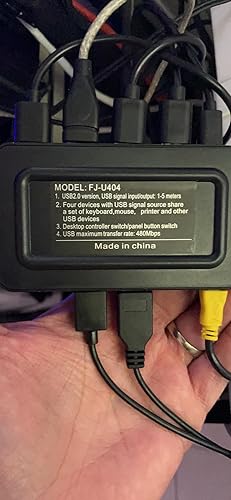


The USB Switch Selector 4 Port is a convenient device for connecting and sharing USB devices between multiple computers. It offers 4 ports for connecting USB devices such as keyboards, mice, printers, and scanners, allowing users to switch between 4 computers easily. The switch box comes with a desktop controller for effortless switching. Customers have generally had positive experiences with this USB switch selector. They have found it to be reliable and efficient in sharing USB devices between their computers. One customer mentions using the switch to connect four laptops to a USB dock, which allows them to seamlessly switch between multiple screens, keyboards, mice, cameras, and microphones. Another customer appreciates how easy it is to switch between work and personal computers using this device. The USB switch box is well-designed and works well with newer PC hardware. However, there have been some compatibility issues reported. Older PCs, such as those with Core2-Duo processors, may hang during the boot stage if their port is selected. Additionally, the switch may not be recognized by Raspberry Pi 4s, which can be problematic for users trying to connect multiple keyboards or mice. Despite these compatibility concerns, most customers have had a positive experience with this USB switch selector. The device does not support hotkey switching but can be controlled using a wired remote control or buttons on the switch itself. The switch offers minimal delay when switching between connections, which is essential for smooth operation. One small gripe that some customers have mentioned is that the power cord connection is USB-C and may not provide a secure fit, potentially coming loose easily. However, this may not be a significant issue for all users, especially if they do not require the use of the power connection. In summary, the USB Switch Selector 4 Port is a reliable and efficient device for sharing USB devices between multiple computers. It offers convenient switching options and minimal delay. While there have been some compatibility issues and a minor concern with the power cord connection, overall, customers have had positive experiences with this USB switch selector.
Customer Reviews & Ratings
150 customers ratings
-
5 Star
66%
-
4 Star
17%
-
3 Star
5%
-
2 Star
2%
-
1 Star
10%
Review this product
Share your thoughts with other customers
Pros
- Reliable and efficient in sharing USB devices between multiple computers
- Easy to switch between computers
- Minimal delay when switching between connections
- Convenient desktop controller included
Cons
- Power cord connection (USB-C) may not provide a secure fit
Related Categories
Related Brands
Product Price History
Important information
- Limitations : For products shipped internationally, please note that any manufacturer warranty may not be valid; manufacturer service options may not be available; product manuals, instructions, and safety warnings may not be in destination country languages; the products (and accompanying materials) may not be designed in accordance with destination country standards, specifications, and labeling requirements; and the products may not conform to destination country voltage and other electrical standards (requiring use of an adapter or converter if appropriate). The recipient is responsible for assuring that the product can be lawfully imported to the destination country. When ordering from Ubuy or its affiliates, the recipient is the importer of record and must comply with all laws and regulations of the destination country.
- Not all the products listed on Ubuy are for sale, as Ubuy is a global search engine. Products are subject to export/trade regulations.
GMD 2627
Order now and get it around Wednesday, June 24
This item is not restrict in my country.(Please click on above link if this item is not restrict in your country, So our team will review and allow.)
QTY:
Only 2 items left in stock.
Secured transaction
Ubuy works hard to protect your security and privacy. Our advanced payment security system ensures confidentiality by encrypting your information during transmission using AES (Advanced Encryption Standards) and SSL (Secure Socket Layer) protocols. Your payment details are 100% secure as we do not share your payment details with third party sellers.
Our Top Logistics Partners
Fastest cross-border delivery
Features & Benefits
- 4 Port USB Switch Box
- 2 Switching Methods
- Wide Compatibility
- Stable Signal Transmission
- Package Contents