
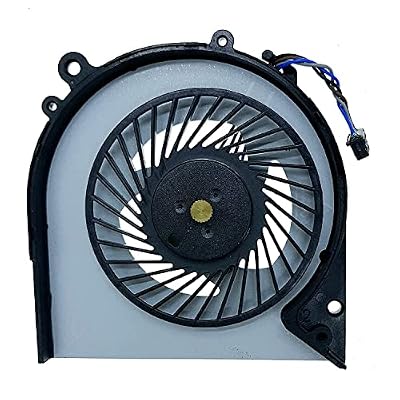
Replacement CPU Cooling Fan for H P EliteBook 820 G3 EliteBook 720 725 G3 G4 Series Laptop 821691-00
 Imported from USA store

Ubuy works hard to protect your security and privacy. Our advanced payment security system ensures confidentiality by encrypting your information during transmission using AES (Advanced Encryption Standards) and SSL (Secure Socket Layer) protocols. Your payment details are 100% secure as we do not share your payment details with third party sellers.


Fast
Shipping

Free
Return*

Secure Packaging

100% Original Products

PCI DSS Compliance

ISO 27001 Certified


What Stands Out
Product Details
| Wattage | 3 watts |
| Compatible Devices | Laptop |
| Maximum Rotational Speed | 3500 RPM |
| Brand Name | Rangale |
| Manufacturer | YDLan |
| Part Number | DFS531205HC0T |
| Item Weight | 0.02 Kilograms |
| Unit Count | 1.0 Count |
| Brand | Rangale |
Who Should Buy?

-
Laptop Users
Ideal for anyone experiencing overheating issues with their HP EliteBook 820 G3 or similar models.
-
DIY Enthusiasts
Great for tech-savvy individuals who prefer to replace their laptop components themselves for cost-effectiveness.
-
Office Professionals
Beneficial for those using their laptops for long hours to maintain performance and avoid downtime.

-
Non-Technical Users
Not suitable for individuals uncomfortable with hardware replacements or lacking technical skills for installation.
Product Description
Replacement CPU Cooling Fan for H P EliteBook 820 G3 EliteBook 720 725 G3 G4 Series Laptop 821691-00
Customer Questions & Answers
-
Question:
What models are compatible with the Replacement CPU Cooling Fan 821691-00?
Answer: The Replacement CPU Cooling Fan 821691-00 is compatible with several HP EliteBook models, specifically the EliteBook 820 G3, EliteBook 720, 725 G3, and G4 series laptops. This compatibility means that if you own any of these models and are experiencing overheating issues or excessive noise from the fan, this replacement part is an ideal solution. Additionally, ensuring the correct fan model is fitted will help maintain performance and extend the lifespan of your laptop. -
Question:
How do I know if my CPU cooling fan needs replacement?
Answer: Signs that your CPU cooling fan may need replacement include your laptop overheating, unusual loud noises during operation, or frequent system crashes. If you notice your EliteBook is running slower or shutting down unexpectedly, these could be indicators that the fan isn't functioning properly. Regularly monitoring your device's temperature can also help; if it feels excessively warm to the touch, it may be time to consider a replacement cooling fan to ensure optimal performance. -
Question:
What tools do I need to install the Replacement CPU Cooling Fan?
Answer: To install the Replacement CPU Cooling Fan, you will typically need a small Phillips screwdriver, possibly a flat-head screwdriver, and an anti-static wrist strap for safety. Using the appropriate tools will ensure you can securely and safely replace the fan without damaging any internal components. Following a detailed guide or video can also aid in the installation process, making it easier to handle each step efficiently. -
Question:
Can I install the fan myself, or should I seek professional help?
Answer: You can install the Replacement CPU Cooling Fan yourself if you have basic technical skills and the right tools. There are numerous online tutorials and videos that can guide you through the process. However, if you feel uncomfortable opening your laptop or lack experience with hardware repairs, it may be best to consult a professional technician. This way, you can ensure the replacement is done correctly and avoid potential damage to your device. -
Question:
How often should I replace my laptop’s cooling fan?
Answer: Generally, a cooling fan can last several years, but it is advisable to check its functionality regularly, especially if you notice performance issues. Factors like dust accumulation, environmental conditions, and usage patterns can impact fan lifespan. If you frequently use your EliteBook for resource-intensive tasks or in dusty environments, consider inspecting the fan at least once a year for any signs of wear and tear. -
Question:
What are the benefits of a properly functioning cooling fan?
Answer: A properly functioning cooling fan is crucial for maintaining optimal laptop performance. It prevents components from overheating, which can lead to throttling, system instability, or even hardware failure. With an efficient cooling system, your HP EliteBook will operate smoothly during demanding tasks such as gaming, video editing, or running multiple applications. This ultimately ensures longevity of your device and consistent efficiency over time. -
Question:
Is there a risk of damaging my laptop when changing the cooling fan?
Answer: While there is a risk of damage during any hardware replacement, taking precautions can minimize this risk. Make sure to power off your laptop and disconnect it from any power source before starting. Use an anti-static wrist strap when handling internal components to avoid static discharge. By following proper procedures and consulting guides, the likelihood of damaging your laptop during the fan replacement process can be significantly reduced. -
Question:
What should I do if the new cooling fan is also making noise?
Answer: If the replacement cooling fan is still making noise, it may indicate a few possible issues, such as improper installation or that the replacement part is defective. First, ensure that the fan is securely attached, and check for any obstruction that may be causing noise. If reinstallation does not resolve the issue, consider testing the fan with different software to rule out software-related noise. In some cases, it may be necessary to replace the fan again with a verified unit. -
Question:
Where can I buy the Replacement CPU Cooling Fan for HP EliteBook 820 G3 and other models?
Answer: You can buy the Replacement CPU Cooling Fan for HP EliteBook 820 G3, 720, 725 G3 and G4 series laptops from Ubuy in The Gambia. Ubuy offers a range of products available for your laptop repair needs, ensuring you have access to genuine replacement parts. Exploring Ubuy guarantees you'll find the right components to keep your device running smoothly.
Rangale Editorial Review
Customer Reviews & Ratings
-
5 Star
100%
-
4 Star
0%
-
3 Star
0%
-
2 Star
0%
-
1 Star
0%
Review this product
Share your thoughts with other customers
Pros
- Improves laptop performance
- Easy to install
- Reduces overheating
- Compatible with many models
Cons
- May be a bit noisy.
Platform Trust & Buyer Confidence

“Excellent quality and original too,when ubuy send original things I will appreciate that ,I very satisfied thank you”
“The order and delivery progress was communicated very well. Package arrived within the estimated time. Products arrived as expected in good condition.”
“Good supply of products. Safe payment methods, and shipment worldwide! Genuine products.”
“Was my first time buying a product from Ubuy, but I found it so helpful. This is reliable. Gonna place a new order!”
“Ubuy is a great online platform to buy stuff. Reliable, fast delivery time and great value for money. I've been using Ubuy online shopping platform for three years now and will continue to do so.”
Important information
- Limitations : For products shipped internationally, please note that any manufacturer warranty may not be valid; manufacturer service options may not be available; product manuals, instructions, and safety warnings may not be in destination country languages; the products (and accompanying materials) may not be designed in accordance with destination country standards, specifications, and labeling requirements; and the products may not conform to destination country voltage and other electrical standards (requiring use of an adapter or converter if appropriate). The recipient is responsible for assuring that the product can be lawfully imported to the destination country. When ordering from Ubuy or its affiliates, the recipient is the importer of record and must comply with all laws and regulations of the destination country.
- Not all the products listed on Ubuy are for sale, as Ubuy is a global search engine. Products are subject to export/trade regulations.
Currently unavailable.
We don't know when or if this item will be back in stock.
This item is not restrict in my country.(Please click on above link if this item is not restrict in your country, So our team will review and allow.)
PCI DSS compliant and ISO 27001:2022 certified, with encrypted payments and full buyer protection on every order.
Ubuy Assurance
Experience worry-free shopping with 100% original products, PCI DSS-compliant payment security, ISO 27001-certified data protection, the fastest cross-border delivery, free returns *, and secure packaging on every order.