- Home Page /
- Office Products /
- Office Electronics /
- Printers & Accessories /
- Printer Parts & Accessories /
- Printer Ink & Toner /
- Toner Cartridges /
- Genuine OEM Konica Minolta Waste Toner Contai...
0 ratings

Item #:
88804940
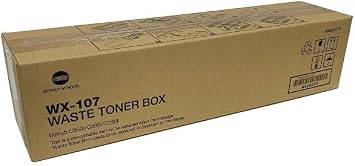
Genuine OEM Konica Minolta Waste Toner Container AAVA0Y1, WX107, Bizhub 300i, 360i, 450i, 550i, 650i, 750i, C250i, C300i, C360i, C450i, C550i, C650i,
Item #:
88804940
GMD 4703
Price Details
Excluding Shipping & Custom charges ( Shipping and custom charges will be calculated on checkout )
*All items will import from US
0 ratings
Write a review
In stock
 Imported from USA store
QTY:
Order now and get it around Tuesday, August 18
Secured transaction
Ubuy works hard to protect your security and privacy. Our advanced payment security system ensures confidentiality by encrypting your information during transmission using AES (Advanced Encryption Standards) and SSL (Secure Socket Layer) protocols. Your payment details are 100% secure as we do not share your payment details with third party sellers.
Our Top Logistics Partners


Optimize your copier's performance with the Konica Minolta AAVA0Y1 Waste Toner Container!

Fast
Shipping

Free
Return*

Secure Packaging

100% Original Products

PCI DSS Compliance

ISO 27001 Certified


Note: Step Down Voltage Transformer required for using electronics products of US store (110-120). Recommended power converters Buy Now.


What Stands Out
Genuine OEM Quality
Ensures compatibility and reliability for a seamless printing experience, reducing the risk of malfunction and maintaining optimal performance across a wide range of Konica Minolta printers.
Comprehensive Compatibility
Designed to fit multiple Konica Minolta models, this waste toner container provides versatility, making it the perfect choice for businesses with various devices in use, ensuring consistent quality across all prints.
Enhanced Efficiency
Optimizes printer functionality by effectively capturing waste toner, leading to longer print runs and less frequent replacements, which ultimately translates to cost savings and reduced downtime for users.
Product Details
| Printer Type | WASTE |
| Other Special Features of the Product | Auto Document Feeder |
| Printer Output Type | BLACK |
| Item Weight | 16 ounces (453.6 grams) |
| Item Dimensions D x W x H | 20"D x 4"W x 4"H (50.8 x 10.2 x 10.2 cm) |
| Print media | Paper (plain) |
| Scanner Type | Automatic Document Feeder |
| Compatible Devices | Bizhub 300i, 360i, 450i, 550i, 650i, 750i, C250i, C300i, C360i, C450i |
| Ink Color | BLACK |
| Additional Printer Functions | Print Only |
| Control Method | Touch |
| Number of Trays | 1 |
| Resolution | 600 x 600 |
| Color Pages per Minute | 5 |
| B&W Pages per Minute | 20 |
| Color | BLACK |
| Maximum print Resolution Color | 600 dpi |
| Maximum Print Resolution Black and White | 600 dpi |
| Dual-sided printing | Yes |
| Duplex | Automatic |
| Brand | TTCopier |
| Model Name | C250i C300i C360i C361i C450i C451i C550i C551i C650i C651i C750i |
| Model Number | AAVA0Y1 |
| Built-In Media | Waste Toner Container |
| Model Series | Bizhub |
| Specific Uses For Product | Office |
| UPC | 769165949530 |
| Manufacturer | Konica Minolta |
| Item Type Name | 1 |
| Unit Count | 1.0 Count |
| Maximum Media Size | 3 x 5 inch (7.6 cm) |
| Maximum Sheet Capacity | 500 |
| Paper Size | 8.5 |
| Printer Connectivity Type | USB |
| Hardware Interface | USB |
| Maximum Copy Resolution Color | 600 dpi |
| Maximum Copy Resolution Black and White | 600 dpi |
| Connectivity Technology | USB |
| Printing Technology | WASTE |
| Special Feature | Auto Document Feeder |
| Printer Output | BLACK |
| Maximum Print Speed (Color) | 5 |
| Max Printspeed Monochrome | 20 |
Who Should Buy?

-
High-Volume Users
Ideal for businesses that print frequently and require reliable waste toner management to maintain print quality.
-
Konica Minolta Owners
Best suited for users of compatible Konica Minolta printers needing OEM containers for optimal performance and reliability.
-
Environmentally-Conscious Buyers
Great for users wanting eco-friendly options, as OEM products often involve responsible recycling practices.

-
Budget-Conscious Users
May not suit those looking for lower-cost compatible alternatives instead of original equipment manufacturer products.
Product Description
Genuine OEM Konica Minolta Waste Toner Container AAVA0Y1, WX107, Bizhub 300i, 360i, 450i, 550i, 650i, 750i, C250i, C300i, C360i, C450i, C550i, C650i, C750i
Have any Query? Chat with us
Customer Questions & Answers
-
Question:
What is the purpose of the Genuine OEM Konica Minolta Waste Toner Container AAVA0Y1?
Answer: The Genuine OEM Konica Minolta Waste Toner Container AAVA0Y1 is designed to collect and store waste toner produced during printing processes. This component is essential for maintaining optimal printer performance and preventing toner overflow, which can lead to print quality issues or damage to the printer. By effectively capturing used toner, this waste container ensures that your printer remains clean and operates efficiently, ultimately extending the lifespan of your printing device. -
Question:
How do I know when to replace the waste toner container?
Answer: You should replace the waste toner container when your printer notifies you through an error message or indicator light. Typically, printers have a specific alert that signals when the container is full. Furthermore, even if you don't receive an alert, it's a good idea to check the container during regular maintenance, especially after printing large volumes. Maintaining the waste toner container properly helps avoid performance issues, ensuring high-quality print outputs. -
Question:
Is the AAVA0Y1 compatible with multiple Konica Minolta models?
Answer: Yes, the Genuine OEM Konica Minolta Waste Toner Container AAVA0Y1 is compatible with a variety of Bizhub models, including 300i, 360i, 450i, 550i, 650i, 750i, and C250i, C300i, C360i, C450i, C550i, and C650i. This compatibility allows you to use the same waste toner container across different devices, simplifying maintenance and inventory management. Choosing OEM parts ensures reliability and optimized performance across all compatible printers. -
Question:
Can I use a third-party waste toner container instead of the OEM part?
Answer: While third-party waste toner containers may be available, it is highly recommended to use Genuine OEM parts like the Konica Minolta AAVA0Y1. OEM containers are specifically designed for your printer’s specifications to ensure compatibility and reliability. Using non-OEM products could lead to printing issues, including leaks or malfunction, which can ultimately cost more in repairs or reduced print quality. Stick with OEM for peace of mind and optimal functionality. -
Question:
What should I do with the used waste toner container?
Answer: Once you have removed the used waste toner container, it's important to dispose of it properly. Many manufacturers, including Konica Minolta, offer recycling programs or take-back options for spent toner containers to reduce environmental impact. Check local disposal guidelines as well. Proper disposal not only helps in recycling materials but also ensures compliance with environmental regulations, contributing to a greener planet. -
Question:
How does using the genuine waste toner container affect print quality?
Answer: Using the Genuine OEM Konica Minolta Waste Toner Container AAVA0Y1 directly impacts print quality. An authentic waste toner container ensures that waste toner is effectively captured and stored, preventing any toner overflow or contamination in the printer. This means that prints will be consistently sharp and clear, without any issues like streaks or smudges that can occur with non-compliant containers. Therefore, using the right parts is crucial for maintaining the high-quality performance of your printer. -
Question:
Where can I buy Genuine OEM Konica Minolta Waste Toner Container AAVA0Y1?
Answer: You can purchase the Genuine OEM Konica Minolta Waste Toner Container AAVA0Y1 from Ubuy in The Gambia. Ubuy offers a convenient platform to find genuine products with various shipping options. Ensuring you buy from a trusted source like Ubuy guarantees that you receive authentic OEM parts, which are crucial for the optimal performance of your printing devices. -
Question:
Are there any instructions for installing the waste toner container?
Answer: Yes, installing the Genuine OEM Konica Minolta Waste Toner Container AAVA0Y1 is quite straightforward. First, make sure the printer is turned off and unplugged for safety. Open the printer cover and locate the waste toner compartment. Remove the old container, if applicable. Then, insert the new waste toner container into the designated space until it clicks into place. Close the printer cover and power it on. Following these steps ensures a secure fit and proper functionality. -
Question:
How can I maintain my printer to extend the life of the waste toner container?
Answer: To extend the life of your Genuine OEM Konica Minolta Waste Toner Container AAVA0Y1, regular maintenance of your printer is essential. Keep the printer clean by dusting off surfaces and ensuring that paper paths are clear of debris. Regularly run print diagnostics to identify any potential issues. Additionally, monitor your print volume and adjust settings for efficiency. All these practices help reduce waste and prolong the lifespan of both the waste container and your printer. -
Question:
What are the environmental benefits of using OEM waste toner containers?
Answer: Using Genuine OEM waste toner containers like the Konica Minolta AAVA0Y1 not only supports optimal printer performance but also offers significant environmental benefits. OEM containers are built with recycling in mind, allowing for safer disposal methods. By using OEM products, you contribute to fewer leaks and inefficient waste management practices that can harm the environment. This commitment to quality and sustainability can result in a lower carbon footprint and better recycling outcomes.
TTCopier Toner Cartridges AAVA0Y1 Editorial Review
No editorial reviews found
Customer Reviews & Ratings
1 customers ratings
-
5 Star
0%
-
4 Star
100%
-
3 Star
0%
-
2 Star
0%
-
1 Star
0%
Review this product
Share your thoughts with other customers
Pros
- High-quality OEM product
- Easy installation process
- Compatible with multiple models
- Effective toner waste management
- Reliable performance and durability
Platform Trust & Buyer Confidence

MA
Mohammad
Verified buyer
“Excellent quality and original too,when ubuy send original things I will appreciate that ,I very satisfied thank you”
23 July 2026 · via Trustpilot
CK
Chitra
Verified buyer
“The order and delivery progress was communicated very well. Package arrived within the estimated time. Products arrived as expected in good condition.”
22-Jul-26 · via Trustpilot
K
kund
Verified buyer
“Good supply of products. Safe payment methods, and shipment worldwide! Genuine products.”
23-Jul-26 · via Trustpilot
OO
Onesi
Verified buyer
“Was my first time buying a product from Ubuy, but I found it so helpful. This is reliable. Gonna place a new order!”
22 July 2026 · via Trustpilot
SJ
SAO JOHN
Verified buyer
“Ubuy is a great online platform to buy stuff. Reliable, fast delivery time and great value for money. I've been using Ubuy online shopping platform for three years now and will continue to do so.”
23 July 2026 · via Trustpilot
Secure Checkout
Global Delivery
Easy Returns
Genuine Products
Product Price History
Important information
- Limitations : For products shipped internationally, please note that any manufacturer warranty may not be valid; manufacturer service options may not be available; product manuals, instructions, and safety warnings may not be in destination country languages; the products (and accompanying materials) may not be designed in accordance with destination country standards, specifications, and labeling requirements; and the products may not conform to destination country voltage and other electrical standards (requiring use of an adapter or converter if appropriate). The recipient is responsible for assuring that the product can be lawfully imported to the destination country. When ordering from Ubuy or its affiliates, the recipient is the importer of record and must comply with all laws and regulations of the destination country.
- Not all the products listed on Ubuy are for sale, as Ubuy is a global search engine. Products are subject to export/trade regulations.
GMD 4703
Order now and get it around Tuesday, August 18
This item is not restrict in my country.(Please click on above link if this item is not restrict in your country, So our team will review and allow.)
QTY:
Secured transaction
PCI DSS compliant and ISO 27001:2022 certified, with encrypted payments and full buyer protection on every order.
Our Top Logistics Partners
Fastest cross-border delivery
Features & Benefits
- Essential for maintaining optimal copier functionality.
- Compatible with a wide range of Konica Minolta BIZHUB models.
- Designed to ensure maximum efficiency and quality.
- Easy to install, making replacement quick and hassle-free.
- Reduces downtime for your business operations.
- A must-have accessory to enhance your printing experience.
Ubuy Assurance
Experience worry-free shopping with 100% original products, PCI DSS-compliant payment security, ISO 27001-certified data protection, the fastest cross-border delivery, free returns *, and secure packaging on every order.