0 ratings




Item #:
114391026
HP DeskJet 2855e Wireless All-in-One Color Inkjet Printer, Scanner, Copier, Best-for-home, 2.4 ghz capable. (588S5A)
 1 Sustainability Highlights
Item #:
114391026
GMD 8495
Price Details
Excluding Shipping & Custom charges ( Shipping and custom charges will be calculated on checkout )
*All items will import from US
In stock
 Imported from USA store
QTY:
Order now and get it around Saturday, August 15
Secured transaction
Ubuy works hard to protect your security and privacy. Our advanced payment security system ensures confidentiality by encrypting your information during transmission using AES (Advanced Encryption Standards) and SSL (Secure Socket Layer) protocols. Your payment details are 100% secure as we do not share your payment details with third party sellers.
Our Top Logistics Partners


FROM AMERICA'S MOST TRUSTED PRINTER BRAND – The DeskJet 2855e is perfect for homes printing to-do lists, letters, financial documents and recipes.

Fast
Shipping

Free
Return*

Secure Packaging

100% Original Products

PCI DSS Compliance

ISO 27001 Certified


Note: Step Down Voltage Transformer required for using electronics products of US store (110-120). Recommended power converters Buy Now.


What Stands Out
All-in-One Functionality
Combining printing, scanning, and copying in one unit eliminates clutter, providing convenience for home offices and families needing versatile solutions without extra devices.
Wireless Connectivity
Single-band Wi-Fi enables easy mobile printing from smartphones and tablets, enhancing user experience and flexibility by removing the need for wired connections.
Instant Ink Offer
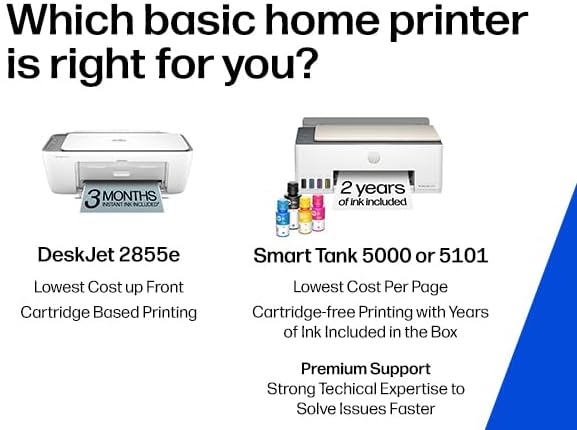
Includes three months of Instant Ink subscription, ensuring users have hassle-free ink delivery and cost savings, preventing downtime when running low on supplies.
Product Details
- The DeskJet 2855e is perfect for homes printing to-do lists, letters, financial documents and recipes. Print speeds up to 5.5 ppm color, 7.5 ppm black
- PERFECTLY FORMATTED PRINTS WITH HP AI – Print web pages and emails with precision—no wasted pages or awkward layouts; HP AI easily removes unwanted content, so your prints are just the way you want
- KEY FEATURES – Color printing, copy, scan, and a 60-sheet input tray
- WIRELESS PRINTING – Stay connected with our most reliable Wii-Fi, which automatically detects and resolves connection issues.This printer is only 2.4 ghz capable.
- 3 MONTHS OF INSTANT INK WITH HP+ ACTIVATION – Subscribe to Instant Ink delivery service to get ink delivered directly to your door before you run out. After 3 months, monthly fee applies unless cancelled
- HP APP – Print, scan, copy, or fax right from your smartphone, PC, or tablet with the easiest-to-use print app
| Printer Type | Inkjet |
| Other Special Features of the Product | wireless |
| Printer Output Type | Color |
| Item Weight | 10 pounds (4.54 kg) |
| Item Dimensions D x W x H | 11.97"D x 16.7"W x 6.06"H (30.4 x 42.4 x 15.4 cm) |
| Controller Type | iOS |
| Print media | Envelopes, Glossy photo paper, Paper (plain) |
| Scanner Type | Flatbed |
| Maximum Copy Speed Black and White | 7.5 pages_per_minute |
| Compatible Devices | Smartphones |
| Maximum Copies Per Run | 9 |
| Ink Color | black, cyan, magenta, yellow |
| Additional Printer Functions | All In One |
| Control Method | App |
| Compatible Cartridge | HP 67 |
| Number of Trays | 1 |
| Processor Count | 1 |
| Display Type | LCD |
| Resolution | 4800 x 1200 |
| Color | white |
| Color Depth | 24 bpp |
| Maximum print Resolution Color | 4800 x 1200 dpi |
| Maximum Print Resolution Black and White | 600 dpi |
| Printer Resolution Horizontal in Black and White | 14 inches (35.6 cm) |
| Printer Resolution Vertical in Black and White | 8 inches (20.3 cm) |
| Wattage | 2.8 watts |
| Maximum Copy Resolution Color | 4800 x 1200 dpi |
| Maximum Copy Resolution Black and White | 600 dpi |
| Brand | HP |
| Model Name | DeskJet 2855e All-in-One Printer |
| Model Number | 588S5A#B1H |
| Built-In Media | 588S5A HP DeskJet 2855e All-in-One; HP 67 Setup Black Cartridge; HP 67 Setup Tri-color Cartridge; Regulatory flyer; Setup guide; Reference guide; Power cord [For ink volume and page yield information, visit http://hp.com/go/learnaboutsupplies ] |
| Model Series | 2855e |
| Specific Uses For Product | Office |
| UPC | 196337380097 |
| Unit Count | 1 Count |
| Item Type Name | Inkjet Printer |
| Manufacturer | HP |
| Color Pages per Minute | 5.5 pages_per_minute |
| B&W Pages per Minute | 7.5 pages_per_minute |
| Initial Page Print Time | 15 seconds |
| Maximum Media Size | 3 x5 to 8.5 x 14 in (7.6 x 148.6 x 35.6 cm) |
| Maximum Sheet Capacity | 60 |
| Paper Size | 3 x 5 to 8.5 x14 inches (7.6 x 148.6 x 35.6 cm) |
| Output sheet capacity | 60 |
| Printer Connectivity Type | single band wi-fi (2.4ghz only) |
| Hardware Interface | USB 2.0 |
| Total Usb Ports | 1 |
| Duplex | Manual |
| Connectivity Technology | single band wi-fi (2.4ghz only) |
| Printing Technology | Inkjet |
| Special Feature | wireless |
| Printer Output | Color |
| Maximum Print Speed (Color) | 5.5 pages_per_minute |
| Max Printspeed Monochrome | 7.5 pages_per_minute |
What's in the box
588S5A HP DeskJet 2855e All-in-One; HP 67 Setup Black Cartridge; HP 67 Setup Tri-color Cartridge; Regulatory flyer; Setup guide; Reference guide; Power cord [For ink volume and page yield information, visit http://hp.com/go/learnaboutsupplies ]
Who Should Buy?

-
Home Users
Ideal for families needing versatile printing, scanning, and copying functionalities at an affordable price.
-
Students
Great for students who require a reliable printer for assignments, projects, and homework submissions.
-
Casual Users
Perfect for occasional printing needs, like documents and photos, without overwhelming features or complexities.

-
High-Volume Users
Not suitable for businesses or users needing to print large volumes regularly due to speed and capacity limitations.
Product Description
Sustainability Highlights
This product has sustainability features recognized by trusted certifications.
Energy efficiency
Conserves energy compared to similar products. As certified by
Products that earn the U.S. Environmental Protection Agency’s ENERGY STAR label are independently certified to use less energy than standard models, reducing carbon pollution associated with energy generation and lowering your energy bill. For more information, visit energystar.gov. Learn more about this certification
Have any Query? Chat with us
Customer Questions & Answers
-
Question:
What is the HP DeskJet 2855e capable of?
Answer: The HP DeskJet 2855e is an all-in-one printer designed to handle printing, scanning, and copying tasks seamlessly. It delivers vibrant color prints suitable for various documents, making it ideal for both home use and small office tasks. With wireless connectivity, you can easily print from your smartphone, tablet, or laptop without the hassle of wires. Whether you're printing school projects or family photos, this printer offers versatility for everyday use. -
Question:
How do I set up the HP DeskJet 2855e?
Answer: Setting up the HP DeskJet 2855e is straightforward. Start by unboxing the printer and connecting it to a power source. Then, download the HP Smart app on your mobile device or computer to guide you through the setup process. You'll need to connect to your Wi-Fi network and install the included ink cartridges. Once set up, you can begin printing, scanning, or copying with ease. This makes it user-friendly even for those unfamiliar with technology. -
Question:
What is Instant Ink and how does it work with the HP DeskJet 2855e?
Answer: Instant Ink is a subscription service for ink cartridges offered by HP, which is included for the first three months with the DeskJet 2855e. It monitors ink levels and automatically orders replacement cartridges when needed, so you never run out of ink unexpectedly. After the trial period, you can choose a plan that fits your printing habits. This service simplifies maintenance and ensures you always have the ink necessary for your printing tasks. -
Question:
Can the HP DeskJet 2855e print in black and white?
Answer: Yes, the HP DeskJet 2855e can print in both color and black and white. This functionality ensures flexibility for printing documents, flyers, or school assignments. Additionally, when using black ink, text documents are printed with clear and crisp detail. This makes it suitable for both professional and personal printing needs, allowing users to choose the color option based on their specific requirements. -
Question:
Is the HP DeskJet 2855e compatible with mobile devices?
Answer: Absolutely! The HP DeskJet 2855e offers compatibility with mobile devices via the HP Smart app. This app not only allows you to print directly from your smartphone or tablet but also enables you to scan documents and manage printer settings. Whether you're on the couch or at the office, you can easily print your essential documents from anywhere, enhancing convenience for busy lifestyles. -
Question:
What types of paper can the HP DeskJet 2855e use?
Answer: The HP DeskJet 2855e is versatile in terms of paper types and can accommodate various paper formats. It supports standard letter, legal, and A4-sized paper, as well as envelopes and photo paper. This flexibility allows users to create different projects, ranging from reports to photo prints, making it an excellent choice for home usage, especially for crafting or family scrapbooks. -
Question:
How do I connect the HP DeskJet 2855e to Wi-Fi?
Answer: To connect the HP DeskJet 2855e to Wi-Fi, ensure your printer is powered on, then use the HP Smart app for a guided setup. The app will prompt you to select your Wi-Fi network and enter the password. Alternatively, you can use the control panel on the printer to select the wireless option and follow the instructions to establish a connection. Once connected, you can print wirelessly from multiple devices, enhancing productivity. -
Question:
What is the print speed of the HP DeskJet 2855e?
Answer: The HP DeskJet 2855e offers decent print speeds, producing up to 7.5 pages per minute for black and white documents, and approximately 5.5 pages per minute for color prints. While it's optimized for quality prints, it still maintains a reasonable output for daily home printing tasks. This makes it suitable for your routine needs, from printing homework to important documents, without excessive waiting. -
Question:
How do I troubleshoot common issues with the HP DeskJet 2855e?
Answer: Troubleshooting the HP DeskJet 2855e typically involves checking common issues like connectivity, ink levels, and paper jams. Start by ensuring the printer is connected to Wi-Fi and that the HP Smart app is updated. If you encounter a paper jam, carefully remove any stuck paper following the printer's instructions. Maintaining updated drivers and having fresh ink cartridges can also prevent many typical issues, ensuring a smooth printing experience. -
Question:
Where can I buy the HP DeskJet 2855e Wireless All-in-One Printer in The Gambia?
Answer: You can buy the HP DeskJet 2855e Wireless All-in-One Color Inkjet Printer, Scanner, and Copier from Ubuy in The Gambia. This platform offers a seamless online purchasing experience, ensuring you have access to this versatile printer along with the included three months of Instant Ink service. Ubuy is a reliable choice for sourcing quality tech products, making it easy to enhance your home office setup.
HP Inkjet Printers 588S5A#B1H Editorial Review


The HP DeskJet 2855e Wireless All-in-One Printer has garnered a mix of reviews from customers, reflecting widely differing experiences. On one hand, several users praise the printer's straightforward setup process and overall functionality, repeatedly noting that it delivers clear prints and efficiently handles a variety of tasks from documents to photos. Many home users appreciate the wireless connection, which seamlessly integrates with mobile devices, as well as the compact design that fits nicely into smaller spaces. However, not all feedback is positive. A significant portion of customers has encountered frustrating problems with the printer’s paper feeder, citing issues where the rollers fail to grab the paper correctly. These mechanical shortcomings have led to repeated errors and inoperability, leaving some users feeling that the printer is unreliable. Compounding this frustration are reports of inadequate customer service, with long wait times for support and unhelpful responses that leave users stuck with unresolved issues. This has caused dissatisfaction, particularly among those who attempted to utilize the printer in challenging network environments, such as university dorms, where setup Constraints severely limited their ability to connect. In summary, while the HP DeskJet 2855e has many advocates who appreciate its ease of use and print quality, significant flaws in reliability and customer support resonate strongly with others, leading to a polarized reception. **
Customer Reviews & Ratings
19522 customers ratings
-
5 Star
57%
-
4 Star
9%
-
3 Star
6%
-
2 Star
4%
-
1 Star
24%
Review this product
Share your thoughts with other customers
Pros
- Easy setup process and user-friendly app.
- Delivers clear and high-quality prints for various uses.
- Compact design suitable for small spaces.
- Wireless connectivity allows printing from mobile devices.
Cons
- Frustrating problems with network setup, particularly in public environments.
Platform Trust & Buyer Confidence

MA
Mohammad
Verified buyer
“Excellent quality and original too,when ubuy send original things I will appreciate that ,I very satisfied thank you”
23 July 2026 · via Trustpilot
CK
Chitra
Verified buyer
“The order and delivery progress was communicated very well. Package arrived within the estimated time. Products arrived as expected in good condition.”
22-Jul-26 · via Trustpilot
K
kund
Verified buyer
“Good supply of products. Safe payment methods, and shipment worldwide! Genuine products.”
23-Jul-26 · via Trustpilot
OO
Onesi
Verified buyer
“Was my first time buying a product from Ubuy, but I found it so helpful. This is reliable. Gonna place a new order!”
22 July 2026 · via Trustpilot
SJ
SAO JOHN
Verified buyer
“Ubuy is a great online platform to buy stuff. Reliable, fast delivery time and great value for money. I've been using Ubuy online shopping platform for three years now and will continue to do so.”
23 July 2026 · via Trustpilot
Secure Checkout
Global Delivery
Easy Returns
Genuine Products
Product Price History
Important information
- Limitations : For products shipped internationally, please note that any manufacturer warranty may not be valid; manufacturer service options may not be available; product manuals, instructions, and safety warnings may not be in destination country languages; the products (and accompanying materials) may not be designed in accordance with destination country standards, specifications, and labeling requirements; and the products may not conform to destination country voltage and other electrical standards (requiring use of an adapter or converter if appropriate). The recipient is responsible for assuring that the product can be lawfully imported to the destination country. When ordering from Ubuy or its affiliates, the recipient is the importer of record and must comply with all laws and regulations of the destination country.
- Not all the products listed on Ubuy are for sale, as Ubuy is a global search engine. Products are subject to export/trade regulations.
GMD 8495
Order now and get it around Saturday, August 15
This item is not restrict in my country.(Please click on above link if this item is not restrict in your country, So our team will review and allow.)
QTY:
Secured transaction
PCI DSS compliant and ISO 27001:2022 certified, with encrypted payments and full buyer protection on every order.
Our Top Logistics Partners
Fastest cross-border delivery
Features & Benefits
- Color printing, scanning, and copying
- Includes 3 months of Instant Ink with HP+ activation
- Reliable wireless printing with automatic connection issue resolution
- Easy printing, scanning, copying, and faxing from HP app
- Sustainable design with at least 60% recycled plastic
- Energy-efficient with ENERGY STAR and EPEAT certification
Ubuy Assurance
Experience worry-free shopping with 100% original products, PCI DSS-compliant payment security, ISO 27001-certified data protection, the fastest cross-border delivery, free returns *, and secure packaging on every order.