0 ratings

Item #:
93065366
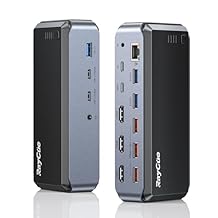
Raycue Triple Monitor USB C Docking Station - MacBook Pro Docking Station with Power Adapter for MacBook M1/M2/M3/Windows, HDMI*3, RJ45, 10Gbps
Item #:
93065366
GMD 9620
Price Details
Excluding Shipping & Custom charges ( Shipping and custom charges will be calculated on checkout )
*All items will import from US
0 ratings
Write a review
In stock
 Imported from USA store
QTY:
Order now and get it around Saturday, June 27
Secured transaction
Ubuy works hard to protect your security and privacy. Our advanced payment security system ensures confidentiality by encrypting your information during transmission using AES (Advanced Encryption Standards) and SSL (Secure Socket Layer) protocols. Your payment details are 100% secure as we do not share your payment details with third party sellers.
Our Top Logistics Partners


Maximize your productivity and workspace with 15 additional connection ports, allowing easy access and efficient multitasking.

Fast
Shipping

Free
Return*

Secure Packaging

100% Original Products

PCI DSS Compliance

ISO 27001 Certified


Note: Step Down Voltage Transformer required for using electronics products of US store (110-120). Recommended power converters Buy Now.


What Stands Out
Triple HDMI Outputs
Seamlessly connect three external displays with stunning clarity, enhancing productivity by providing ample screen space for multitasking and immersive media experiences.
High-Speed Connectivity
Equipped with 10Gbps USB ports and RJ45 Ethernet, ensure rapid data transfer and stable internet connections, effectively minimizing downtime and improving overall workflow efficiency.
Versatile Compatibility
Designed for both MacBook M1/M2/M3 and Windows laptops, this docking station offers ultimate flexibility, catering to diverse user needs while maximizing device functionality.
Product Details
| Item Weight | 1.5 lbs (680 grams) |
Who Should Buy?

-
Creative Professionals
Ideal for graphic designers and video editors who need multiple display outputs for enhanced productivity.
-
Remote Workers
Perfect for remote employees needing a versatile hub to connect various peripherals at home or in the office.
-
Tech Enthusiasts
Great for users who have multiple devices and require high-speed connectivity options with extensive ports.

-
Casual Users
Individuals who only use basic connectivity won't need advanced features and ports this docking station offers.
-
Traveling Professionals
Not suitable for users who prioritize portability and lightweight solutions over extensive functionality.
-
Basic Students
Students needing simple connections for tasks like browsing and document editing may find it excessive.
Product Description
Raycue Triple Monitor USB C Docking Station - MacBook Pro Docking Station with Power Adapter for MacBook M1/M2/M3/Windows, HDMI*3, RJ45, 10Gbps USB*5, PD, USB 3.0 * 2
Have any Query? Chat with us
Customer Questions & Answers
-
Question:
What devices are compatible with the Raycue 15 IN1 USB C Docking Station?
Answer: The Raycue 15 IN1 USB C Docking Station is designed for seamless compatibility with MacBook Pro models M1, M2, and M3, as well as various Windows laptops equipped with USB-C ports. This versatile dock allows multiple connections, making it ideal for diverse setups. Users can enjoy features like extended displays and additional USB ports, catering to professionals in creative, business, and educational fields who require high performance and connectivity. -
Question:
How does the triple monitor setup work with this docking station?
Answer: The Raycue Docking Station supports a triple monitor configuration by utilizing its HDMI and DisplayPort outputs. You can connect three external displays simultaneously, enhancing productivity by providing more screen real estate. This setup is particularly beneficial for graphic designers, traders, and anyone who multitasks extensively; you can have documents open on one screen, video calls on another, and your media applications on a third. -
Question:
What types of ports are included in the Raycue 15 IN1 Docking Station?
Answer: This docking station offers an extensive range of ports including three USB 3.0 ports, two USB-C ports, an HDMI port, a DisplayPort, Ethernet, a headphone and mic combo, and an SD card reader. This collection of ports ensures that you can connect multiple peripherals like external hard drives, monitors, and audio devices effortlessly. It’s an excellent choice for users looking to streamline their workspace with enhanced connectivity options. -
Question:
Can this docking station charge my laptop while using it?
Answer: Yes, the Raycue USB C Docking Station is equipped with a Power Delivery feature that allows it to charge your MacBook or Windows laptop while in use. With adequate wattage, this dock ensures that your device stays powered even during demanding tasks such as video editing or gaming. This makes it an optimal solution for professionals and creators who require uninterrupted power during intensive operations. -
Question:
How to set up the Raycue 15 IN1 Docking Station?
Answer: Setting up the Raycue Docking Station is straightforward: simply connect it to your laptop's USB-C port, plug in an external monitor via HDMI or DisplayPort, and link any additional peripherals through the USB ports. The station is often plug-and-play, meaning it automatically recognizes connected devices, making it a reliable choice for both tech-savvy and novice users. -
Question:
Is the Raycue Docking Station portable?
Answer: Yes, the Raycue 15 IN1 Docking Station is designed with portability in mind. The compact and lightweight design allows you to easily slip it into a laptop bag, making it appropriate for on-the-go professionals. Whether you're heading to a client meeting or working from a café, this docking station enables you to set up your workstation quickly and efficiently, ensuring you maintain productivity wherever you are. -
Question:
Can I use this docking station with other USB-C devices?
Answer: Absolutely! The Raycue Docking Station is not limited to just MacBooks and Windows laptops; it can also support other USB-C enabled devices such as tablets and smartphones. While the functionality may vary based on the device, you can typically use it for connecting displays and transferring files efficiently. This flexibility makes it a great investment for users with multiple devices across different platforms. -
Question:
What should I do if I encounter issues with my docking station?
Answer: If you face problems with your Raycue Docking Station, first ensure all connections are securely made and that your devices are fully updated. Refer to the user manual for troubleshooting tips or check for any software updates that might enhance performance. Additionally, you can find online support or community forums where users share solutions, making it easier to address any technical difficulties. -
Question:
Is there any software required to use the docking station effectively?
Answer: No additional software is required to use the Raycue 15 IN1 Docking Station effectively. It typically operates through plug-and-play functionality, which allows users to connect devices without the need for extra installations. This is particularly advantageous for users seeking a hassle-free experience without dealing with software settings. However, some advanced features may benefit from updated operating systems, so keep your devices current for optimal performance. -
Question:
Where can I buy the Raycue 15 IN1 USB C Docking Station in The Gambia?
Answer: You can purchase the Raycue 15 IN1 USB C Docking Station from Ubuy, which offers a reliable platform for obtaining electronics and tech accessories. Ubuy provides a user-friendly shopping experience, allowing you to view product ratings, detailed descriptions, and customer reviews to help in making an informed decision. Enjoy a smooth online shopping process with a variety of payment options available on their platform.
RayCue Docking Stations Editorial Review
The Raycue 15 IN 1 USB C Docking Station has garnered a mixed flurry of reactions from users, with a significant number praising its performance, while others express concerns about durability issues. Users highlight the docking station's versatility with multiple HDMI ports and USB connections, making it a practical companion for both gaming and work setups. Many appreciate the compact, lightweight design, which allows for easy mobility while still delivering solid performance for multiple monitors. The included fabric-covered cable is also a point of approval, being noted for its durability. However, there are critical voices that mention reliability problems, with some devices reportedly failing within a few months of use, leading to frustration among customers. While the docking station works well initially, issues with stability and performance have led some users to look for alternatives. Additionally, a few have mentioned the noise level as a drawback, and the lack of a comprehensive user guide has been noted as an inconvenience. Overall, while the Raycue USB C Docking Station offers a robust set of features and functionalities attractive to users needing multi-device connectivity, its long-term reliability remains in question. **
Customer Reviews & Ratings
1 customers ratings
-
5 Star
100%
-
4 Star
0%
-
3 Star
0%
-
2 Star
0%
-
1 Star
0%
Review this product
Share your thoughts with other customers
Pros
- Multiple ports including HDMI, USB, and Ethernet for versatile connectivity.
- Compact and lightweight design, easy for mobility.
- Sleek aesthetics.
- Good initial performance and ease of setup.
Cons
- Durability concerns with some devices failing within months.
Product Price History
Important information
- Limitations : For products shipped internationally, please note that any manufacturer warranty may not be valid; manufacturer service options may not be available; product manuals, instructions, and safety warnings may not be in destination country languages; the products (and accompanying materials) may not be designed in accordance with destination country standards, specifications, and labeling requirements; and the products may not conform to destination country voltage and other electrical standards (requiring use of an adapter or converter if appropriate). The recipient is responsible for assuring that the product can be lawfully imported to the destination country. When ordering from Ubuy or its affiliates, the recipient is the importer of record and must comply with all laws and regulations of the destination country.
- Not all the products listed on Ubuy are for sale, as Ubuy is a global search engine. Products are subject to export/trade regulations.
GMD 9620
Order now and get it around Saturday, June 27
This item is not restrict in my country.(Please click on above link if this item is not restrict in your country, So our team will review and allow.)
QTY:
Secured transaction
Ubuy works hard to protect your security and privacy. Our advanced payment security system ensures confidentiality by encrypting your information during transmission using AES (Advanced Encryption Standards) and SSL (Secure Socket Layer) protocols. Your payment details are 100% secure as we do not share your payment details with third party sellers.
Our Top Logistics Partners
Fastest cross-border delivery
Features & Benefits
- Add three monitors and expand storage via a single USB-C cable.
- 15 connection ports simplify device management and increase productivity.
- Ideal for professionals using high-definition monitors for business applications.
- Lay-flat horizontal design saves valuable desk space.
- Supports Power Delivery for reduced laptop battery consumption.
- Compatible with various USB-C laptops for versatile use.