0 ratings


Item #:
233914891
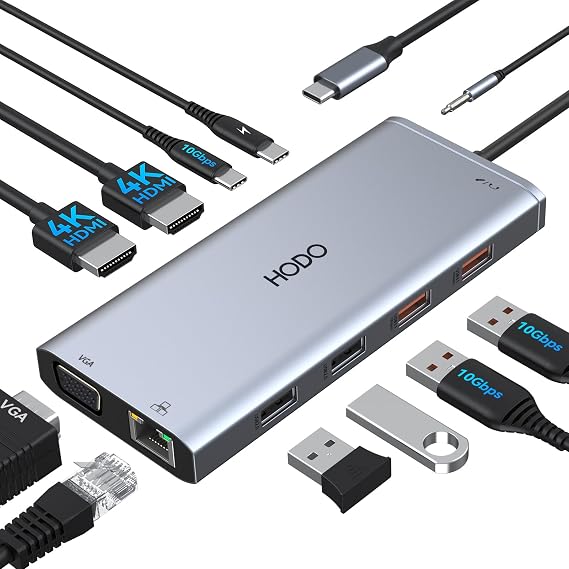
USB C Docking Station Dual Monitor for HP,Laptop Docking Station 3 Monitors
90% of respondents would recommend this to a friend
Item #:
233914891
GMD 3295
Price Details
Excluding Shipping & Custom charges ( Shipping and custom charges will be calculated on checkout )
*All items will import from US
0 ratings
Write a review
In stock
 Imported from USA store
QTY:
Order now and get it around Wednesday, September 30
Secured transaction
Ubuy works hard to protect your security and privacy. Our advanced payment security system ensures confidentiality by encrypting your information during transmission using AES (Advanced Encryption Standards) and SSL (Secure Socket Layer) protocols. Your payment details are 100% secure as we do not share your payment details with third party sellers.
Our Top Logistics Partners


Ensure your device has the necessary ports to experience optimal display and charging capabilities.

Fast
Shipping

Free
Return*

Secure Packaging

100% Original Products

PCI DSS Compliance

ISO 27001 Certified



Note: Step Down Voltage Transformer required for using electronics products of US store (110-120). Recommended power converters Buy Now.


What Stands Out
Triple Display Support
Easily expand your workspace with support for up to three monitors, enhancing productivity and multitasking capabilities for professionals and creatives alike.
High-Speed Connectivity
Experience lightning-fast data transfer rates of up to 10Gbps, ensuring quick access to files while maintaining seamless connections with external devices.
Universal Compatibility
Designed for a wide range of laptops, this docking station is perfect for HP and Dell users, ensuring versatility across various devices without hassle.
Product Details
| Hardware Interface | Ethernet, HDMI, Thunderbolt, USB 2.0, USB 3.0, VGA |
| Additional Features | Fast Charging, Plug and Play |
| Compatible Devices | Work with the Laptop has thunderbolt 3/4 /USB-C 3.1 Gen1/Gen2(with DP)/ USB-C 3.2 Gen 1/Gen2(with DP);Dell XPS 12 2-IN-1 9250/XPS 13 Laptop 9315 9340 9315 9350 9360 9370 9380 9320/XPS/Dell Latitude 3540 Laptop Model/Latitude 3440/3340 or 2-in-1/3450/3550/3110/3140/3420/3445/3510/3500/3520/3540/3571/Alienwarex14/x15/x16/x17 R2 Gaming Laptop/Dell Alienware x15 R7 Gaming Laptop/Alienware m16/m18 Gaming Laptop/HP Spectre Laptop 13-af001TU/Spectre x360 13t/Spectre folio (13t-ak000cto)/HP Spectre x2/HP Spectre x360/HP Eliteu00d72 1012/HP Elitebook Folio G1/HP ZBook 15 G3/HP Laptop 13-af001TU/HP Laptop 13-af001TU/HP Envy Laptop 16-h1047nr/HP Envy x360 13-bd0080ng/HP Envy 360 convertible 15/HP EliteBook 855 G8/HP EliteBook G7/HP EliteBook 860 G10 16 inch/HP EliteBook 860 G9 16inch,etc |
| Total Usb Ports | 5 |
| Data Transfer Rate | 10 gigabits_per_second |
| Number of Ports | 11 |
| Operating System | Windows, macOS |
| Color | Gray |
| Brand | HODO |
| Number of Packs | 1 |
| Item Highlight | USB C Hub Dock Triple Display to 2 HDMI 4K,VGA,Ethernet,10Gbps USB,PD,USB C Adapter 11 in 1 Computer Docking Station for Dell |
| Manufacturer | HODO |
| Number of Items | 1 |
| Unit Count | 1 Count |
| Special Feature | Fast Charging, Plug and Play |
| Compatible Devices | Work with the Laptop has thunderbolt 3/4 /USB-C 3.1 Gen1/Gen2(with DP)/ USB-C 3.2 Gen 1/Gen2(with DP);Dell XPS 12 2-IN-1 9250/XPS 13 Laptop 9315 9340 9315 9350 9360 9370 9380 9320/XPS/Dell Latitude 3540 Laptop Model/Latitude 3440/3340 or 2-in-1/3450/3550/3110/3140/3420/3445/3510/3500/3520/3540/3571/Alienwarex14/x15/x16/x17 R2 Gaming Laptop/Dell Alienware x15 R7 Gaming Laptop/Alienware m16/m18 Gaming Laptop/HP Spectre Laptop 13-af001TU/Spectre x360 13t/Spectre folio (13t-ak000cto)/HP Spectre x2/HP Spectre x360/HP Eliteu00d72 1012/HP Elitebook Folio G1/HP ZBook 15 G3/HP Laptop 13-af001TU/HP Laptop 13-af001TU/HP Envy Laptop 16-h1047nr/HP Envy x360 13-bd0080ng/HP Envy 360 convertible 15/HP EliteBook 855 G8/HP EliteBook G7/HP EliteBook 860 G10 16 inch/HP EliteBook 860 G9 16inch,etc See more |
| Item Weight | 2 lbs (910 grams) |
Who Should Buy?

-
Remote Workers
Perfect for remote workers needing multiple monitors for productivity and efficient multitasking using their laptops.
-
Gamers
Ideal for gamers who want to connect multiple displays and enjoy enhanced visuals through dual HDMI outputs.
-
Design Professionals
Beneficial for graphic designers or video editors requiring high-resolution displays and fast data transfer capabilities.

-
Basic Users
Casual users who only require basic connectivity may find this product overly complex and unnecessary for their needs.
Product Description
USB C Docking Station Dual Monitor for HP,Laptop Docking Station 3 Monitors
Have any Query? Chat with us
Customer Questions & Answers
-
Question:
What is a USB C Docking Station, and how does it work?
Answer: A USB C Docking Station is a device that expands the connectivity options of your laptop or computer by connecting through the USB-C port. It allows you to connect multiple peripherals, including monitors, keyboards, and USB devices. This docking station, in particular, supports dual monitor setups via HDMI and DisplayPort, enabling you to multitask across three screens. For instance, you could have a presentation on one monitor and your documents on another, enhancing productivity. -
Question:
Can the USB C Docking Station support multiple operating systems?
Answer: Yes, this USB C Docking Station is compatible with various operating systems including Windows, macOS, and Chrome OS. Users can seamlessly connect their Dell or HP laptops without worrying about compatibility issues. This versatility is particularly beneficial for professionals who might switch between devices and require a setup that adapts to different systems without any hassle. -
Question:
What display resolutions can this docking station support?
Answer: The docking station supports resolutions up to 4K when using HDMI or DisplayPort connections. This means you can enjoy high-quality visuals for work or entertainment. For example, if you're a graphic designer or a video editor, the clarity provided by 4K resolution will make significant differences in your workflow and the quality of your projects. -
Question:
Do I need any additional software to operate the docking station?
Answer: No additional software is required to operate the USB C Docking Station. It utilizes plug-and-play technology which allows immediate functionality once connected. This quick setup allows users to integrate their devices effortlessly, making it suitable for busy professionals who need to set up quickly for meetings or presentations. -
Question:
Is there support for Ethernet connectivity?
Answer: Yes, this docking station comes equipped with an Ethernet port, offering a stable and reliable internet connection. This is especially useful for users who require a more robust network connection for tasks like video conferencing or large file transfers, ensuring that you stay connected at all times without relying on fluctuating Wi-Fi signals. -
Question:
How does this docking station facilitate a triple monitor setup?
Answer: The USB C Docking Station allows you to connect up to three monitors, providing flexibility for different tasks. You can connect two external displays via HDMI, and an additional display through DisplayPort. This is beneficial for professionals who need an expansive view, like a stock trader managing multiple screens or a developer working on various coding projects simultaneously. -
Question:
What type of USB devices can I connect through this docking station?
Answer: You can connect a variety of USB devices through the docking station's USB ports, including external hard drives, flash drives, and printers. This capability enhances productivity by providing access to necessary devices without cluttering your workspace. For instance, you can easily transfer files from a flash drive while maintaining your workflow across multiple monitors. -
Question:
Is it compatible with MacBooks?
Answer: Yes, this USB C Docking Station is fully compatible with MacBooks, enabling users to extend their display and connect peripheries seamlessly. Mac users can leverage the functionality of dual or triple screens for efficient multitasking, which is ideal for content creators and professionals working in design or software development. -
Question:
Can I charge my laptop using this docking station?
Answer: Yes, depending on your laptop's specifications, you can charge it while using the USB C Docking Station. Many laptops support power delivery through the USB-C port, meaning you won't have to sacrifice charging for connectivity. This feature is particularly useful for ensuring your device remains powered during long work sessions or presentations. -
Question:
Where can I buy the USB C Docking Station Dual Monitor HDMI?
Answer: You can purchase the USB C Docking Station Dual Monitor HDMI from Ubuy. Ubuy provides a wide range of electronic products and is a reliable source for this type of docking station in The Gambia. They offer comprehensive descriptions and customer reviews that can assist you in making an informed decision.
HODO Docking Stations Editorial Review
No editorial reviews found
Customer Reviews & Ratings
1 customers ratings
-
5 Star
100%
-
4 Star
0%
-
3 Star
0%
-
2 Star
0%
-
1 Star
0%
Review this product
Share your thoughts with other customers
Platform Trust & Buyer Confidence

JK
Jasmin
Verified buyer
“Great products and very good service: very easy and very fast international delivery.”
9 September 2026 · via Trustpilot
AG
Anke
Verified buyer
“Wonderful online shopping experience, smooth transaction from the start. Payment method works conveniently and delivery is unexpectedly fast and reliable. You go the extra mile for service. What makes this even more amazing, you deliver to Namibia. I will remain a happy Ubuy customer and will increase my purchases for sure! Thank you!”
10 September 2026 · via Trustpilot
H
Hazel
Verified buyer
“Very easy to find the products what you need, and so fast delivery, that’s why I highly recommended to others costumers to used ubuy.”
10 September 2026 · via Trustpilot
O
Opaleye
Verified buyer
“I received exactly what I ordered I was skeptical about your site because that was my first time to order. But the order came timely and neatly packaged. I was not disappointed. Thank you.”
11 September 2026 · via Trustpilot
AC
Adele
Verified buyer
“Easy to find and order what you want on the website. Delivery is quick to the UK”
8 September 2026 · via Trustpilot
Secure Checkout
Global Delivery
Easy Returns
Genuine Products
Product Price History
Important information
- Limitations : For products shipped internationally, please note that any manufacturer warranty may not be valid; manufacturer service options may not be available; product manuals, instructions, and safety warnings may not be in destination country languages; the products (and accompanying materials) may not be designed in accordance with destination country standards, specifications, and labeling requirements; and the products may not conform to destination country voltage and other electrical standards (requiring use of an adapter or converter if appropriate). The recipient is responsible for assuring that the product can be lawfully imported to the destination country. When ordering from Ubuy or its affiliates, the recipient is the importer of record and must comply with all laws and regulations of the destination country.
- Not all the products listed on Ubuy are for sale, as Ubuy is a global search engine. Products are subject to export/trade regulations.
GMD 3295
Order now and get it around Wednesday, September 30
This item is not restrict in my country.(Please click on above link if this item is not restrict in your country, So our team will review and allow.)
QTY:
Secured transaction
PCI DSS compliant and ISO 27001:2022 certified, with encrypted payments and full buyer protection on every order.
Our Top Logistics Partners
Fastest cross-border delivery
Features & Benefits
- Compatible with Thunderbolt 3/4 and USB-C 3.1 Gen 2 ports.
- Supports up to 4K display resolution with suitable cables.
- Includes multiple port options: Gigabit Ethernet, USB 3.0, SD & Micro SD slots.
- Optimized for dual and triple display setups for Windows, mirror mode for Mac.
- Best performance requires 65W or higher power supply for fast charging.
- HODO provides compatibility checks for your device.
Ubuy Assurance
Experience worry-free shopping with 100% original products, PCI DSS-compliant payment security, ISO 27001-certified data protection, the fastest cross-border delivery, free returns *, and secure packaging on every order.