0 ratings


Item #:
152105358
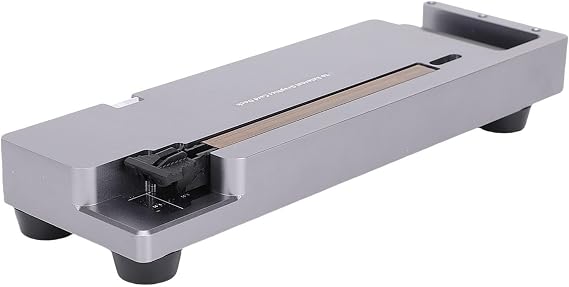
GOWENIC External GPU Docking Station, Laptop External Graphics Card Expansion Dock PCIE 4.0 X16, for OCulink Input, 40Gbps, for Wins 10 11 64 bit for
90% of respondents would recommend this to a friend
Item #:
152105358
GMD 15609
Price Details
Excluding Shipping & Custom charges ( Shipping and custom charges will be calculated on checkout )
*All items will import from US
0 ratings
Write a review
In stock
 Imported from USA store
QTY:
Order now and get it around Thursday, October 29
Secured transaction
Ubuy works hard to protect your security and privacy. Our advanced payment security system ensures confidentiality by encrypting your information during transmission using AES (Advanced Encryption Standards) and SSL (Secure Socket Layer) protocols. Your payment details are 100% secure as we do not share your payment details with third party sellers.
Our Top Logistics Partners


Unleash powerful performance for gaming, AI computations, video editing, and graphic design with our versatile GPU dock.

Fast
Shipping

Free
Return*

Secure Packaging

100% Original Products

PCI DSS Compliance

ISO 27001 Certified



Note: Step Down Voltage Transformer required for using electronics products of US store (110-120). Recommended power converters Buy Now.


What Stands Out
High-Speed Connectivity
Equipped with PCIe 4.0 x16 interface, it offers lightning-fast 40Gbps data transfer speeds, enhancing your gaming and creative experiences with minimal lag and maximum visual quality.
Versatile Compatibility
Designed for Windows 10, 11, and OS X, this dock supports a wide range of laptops, ensuring seamless integration and functionality regardless of your preferred operating system.
Enhanced Graphics Performance
Transform your laptop into a powerful gaming or workstation machine by utilizing an external graphics card, elevating your performance for demanding applications and games.
Product Details
| Brand | GOWENIC |
| Number of Items | 1 |
| Manufacturer | GOWENIC |
| Model Number | GOWENICe97bqd64nu |
| Item Weight | 3.5 lbs (1.59 kg) |
Who Should Buy?

-
Gaming Enthusiasts
Users seeking to enhance gaming performance without upgrading their laptop's internal graphics capabilities will find this ideal.
-
Creative Professionals
Graphic designers and video editors can benefit from the increased graphical power for rendering and processing intensive tasks.
-
Tech Savvy Users
Tech enthusiasts looking to experiment with external GPU setups for high-end applications and gaming will enjoy this product.

-
Casual Users
Individuals who use their laptops for basic tasks like browsing or document editing won’t benefit from this product.
Product Description
GOWENIC External GPU Docking Station, Laptop External Graphics Card Expansion Dock PCIE 4.0 X16, for OCulink Input, 40Gbps, for Wins 10 11 64 bit for OS X
Have any Query? Chat with us
Customer Questions & Answers
-
Question:
What is the GOWENIC External GPU Docking Station used for?
Answer: The GOWENIC External GPU Docking Station allows users to significantly enhance the graphics performance of their laptops by connecting an external graphics card. This is especially beneficial for gaming, graphic design, and video editing tasks where additional graphical power is required. By leveraging PCIE 4.0 X16 and OCulink input, it provides fast data transfer rates of up to 40Gbps, ensuring smooth operations in high-demand applications. -
Question:
Is the GOWENIC External GPU compatible with all laptops?
Answer: The docking station is designed primarily for laptops that support the OCulink interface and have PCIE slots available. It is compatible with Windows 10 and Windows 11 operating systems. To ensure compatibility, it’s crucial to check your laptop's specifications for PCIe support and available slots. For users with compatible laptops, this dock can transform even an entry-level device into a powerful workstation or gaming rig. -
Question:
What types of graphics cards can I use with the GOWENIC Dock?
Answer: You can use a variety of modern graphics cards with the GOWENIC External GPU Docking Station, as long as they fit within the PCIe 4.0 X16 interface. This includes popular brands like NVIDIA and AMD. By using higher-end graphics cards, users can experience significantly improved graphics performance and faster processing times for resource-intensive applications, making this dock a versatile choice for gamers and creative professionals alike. -
Question:
How do I set up the GOWENIC External GPU Docking Station?
Answer: Setting up the GOWENIC Docking Station involves first connecting the dock to your laptop using the OCulink cable. Next, install your compatible graphics card into the dock’s PCIe slot. Following that, install any necessary drivers recommended by the graphics card manufacturer for optimal performance. This straightforward procedure allows you to harness the added power of your external GPU for demanding tasks and games within a matter of minutes. -
Question:
What performance improvements can I expect with the GOWENIC Dock?
Answer: By integrating an external GPU through the GOWENIC Dock, users can expect a marked enhancement in graphical capabilities. Tasks like gaming will exhibit higher frame rates, smoother visuals, and better resolutions. Additionally, creative applications for video editing and 3D rendering will see faster rendering times and improved productivity, enabling users to tackle more complex projects seamlessly. -
Question:
Is there a limit to the power consumption of the GPU used with the dock?
Answer: Yes, the GOWENIC External GPU Docking Station has a maximum power budget that your GPU must stay within. Generally, most standard GPUs can be accommodated, but it's advisable to check the power requirements of your specific graphics card. Adhering to the power limits ensures stability and performance when using the dock, ensuring that you won't encounter unexpected shutdowns or performance throttling. -
Question:
Can I use multiple monitors with the GOWENIC Dock?
Answer: Yes, you can connect multiple monitors to the GOWENIC External GPU Docking Station, provided the graphics card you are using supports multiple displays. This feature is particularly advantageous for professionals who need extensive screen real estate for tasks like coding, editing, or design work. Connecting multiple monitors provides a more efficient workflow and enhances productivity. -
Question:
What accessories do I need for the GOWENIC Dock to work effectively?
Answer: To fully utilize the GOWENIC External GPU Docking Station, you typically need an external graphics card, an OCulink cable, and possibly display cables that match your monitors (such as HDMI or DisplayPort). It's also helpful to have updated drivers installed for your graphics card to ensure the best performance. These accessories will help create a seamless experience as you integrate your dock into your existing setup. -
Question:
Can I use the GOWENIC Dock for gaming purposes?
Answer: Absolutely! The GOWENIC External GPU Docking Station is particularly well-suited for gaming, as it allows laptops to access the performance capabilities of high-end external graphics cards. This provides gamers with improved frame rates, more detailed graphics, and an overall enhanced gaming experience. It's a fantastic solution for laptop users looking to enjoy demanding games without being limited by their internal hardware. -
Question:
Where can I buy the GOWENIC External GPU Docking Station?
Answer: You can purchase the GOWENIC External GPU Docking Station from Ubuy, a reputable online retailer known for offering a wide variety of electronic products. They provide detailed product descriptions and customer support to help you through the buying process. Ubuy offers a convenient platform for purchasing this high-performance gaming accessory, ensuring you have access to the tools needed for an extensive graphics capability on your laptop.
GOWENIC Docking Stations GOWENICe97bqd64nu Editorial Review
No editorial reviews found
Customer Reviews & Ratings
1 customers ratings
-
5 Star
100%
-
4 Star
0%
-
3 Star
0%
-
2 Star
0%
-
1 Star
0%
Review this product
Share your thoughts with other customers
Platform Trust & Buyer Confidence

JK
Jasmin
Verified buyer
“Great products and very good service: very easy and very fast international delivery.”
9 September 2026 · via Trustpilot
AG
Anke
Verified buyer
“Wonderful online shopping experience, smooth transaction from the start. Payment method works conveniently and delivery is unexpectedly fast and reliable. You go the extra mile for service. What makes this even more amazing, you deliver to Namibia. I will remain a happy Ubuy customer and will increase my purchases for sure! Thank you!”
10 September 2026 · via Trustpilot
H
Hazel
Verified buyer
“Very easy to find the products what you need, and so fast delivery, that’s why I highly recommended to others costumers to used ubuy.”
10 September 2026 · via Trustpilot
O
Opaleye
Verified buyer
“I received exactly what I ordered I was skeptical about your site because that was my first time to order. But the order came timely and neatly packaged. I was not disappointed. Thank you.”
11 September 2026 · via Trustpilot
AC
Adele
Verified buyer
“Easy to find and order what you want on the website. Delivery is quick to the UK”
8 September 2026 · via Trustpilot
Secure Checkout
Global Delivery
Easy Returns
Genuine Products
Product Price History
Important information
- Limitations : For products shipped internationally, please note that any manufacturer warranty may not be valid; manufacturer service options may not be available; product manuals, instructions, and safety warnings may not be in destination country languages; the products (and accompanying materials) may not be designed in accordance with destination country standards, specifications, and labeling requirements; and the products may not conform to destination country voltage and other electrical standards (requiring use of an adapter or converter if appropriate). The recipient is responsible for assuring that the product can be lawfully imported to the destination country. When ordering from Ubuy or its affiliates, the recipient is the importer of record and must comply with all laws and regulations of the destination country.
- Not all the products listed on Ubuy are for sale, as Ubuy is a global search engine. Products are subject to export/trade regulations.
GMD 15609
Order now and get it around Thursday, October 29
This item is not restrict in my country.(Please click on above link if this item is not restrict in your country, So our team will review and allow.)
QTY:
Secured transaction
PCI DSS compliant and ISO 27001:2022 certified, with encrypted payments and full buyer protection on every order.
Our Top Logistics Partners
Fastest cross-border delivery
Features & Benefits
- Crafted from durable CNC aluminum alloy for optimal heat dissipation.
- Compatible with a wide range of graphics cards, including RTX and RX series.
- Convenient power switch to easily control dock power.
- Supports high-speed 40Gbps transfer for rapid data handling.
- Ideal for gaming, AI tasks, video editing, and graphic design applications.
- User-friendly design for effortless setup and use.
Ubuy Assurance
Experience worry-free shopping with 100% original products, PCI DSS-compliant payment security, ISO 27001-certified data protection, the fastest cross-border delivery, free returns *, and secure packaging on every order.